


What Is a Context Filter?
If you are preparing for the Tableau Data Analyst exam, you should know that context filters and Level of Detail (LOD) expressions frequently appear together. By default, Tableau computes all filters independently against the entire data source. A context filter changes this behavior: it acts as an independent filter that is applied before standard dimension, measure, and Top N filters (though extract and data source filters still run first). Any standard filters you add afterward become dependent filters, meaning they process only the portion of data that passes through the context filter.
How to Create and Modify a Context Filter
Creating a context filter requires adding a categorical (dimension) filter and elevating it:
- Drag a categorical field to the Filters shelf.
- Right-click the field on the shelf and select Add to Context.
The filter moves to the top of the Filters shelf, turns gray, and can no longer be rearranged on the filters shelf. You can modify or remove a context filter in three ways:
- Remove the field from the Filters shelf entirely.
- Edit the filter, which forces Tableau to recompute the context.
- Right-click the filter and select Remove from Context, which returns it to the shelf as a standard filter.
Why Use a Context Filter?
Context filters are primarily used to force a filter to execute earlier in Tableau's order of operations, specifically before Top N filters, computed sets, and FIXED LOD expressions:
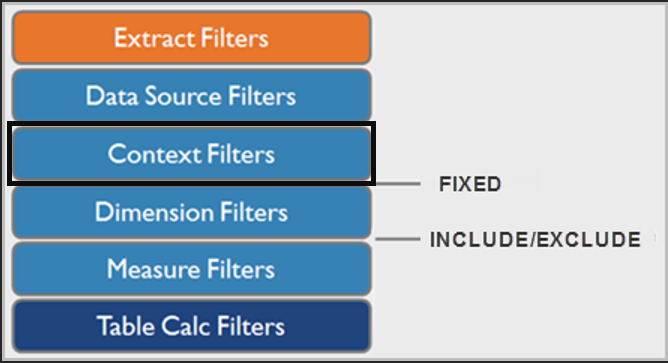
- Top N Filters: If you want to see the top 10 products within a specific category, standard filters will intersect the top 10 products overall with that category (often returning fewer than 10 items). Making the category a context filter ensures Tableau filters to that category first, then finds the top 10 within it.
- FIXED LOD Expressions: FIXED LODs are calculated before standard dimension filters. For example, if you use
{FIXED [Sub-Category] : SUM([Sales])}and add a standard filter for Region, Tableau still computes total sales across all regions before applying your Region filter. Adding Region to context elevates it above theFIXEDLOD, forcing the calculation to evaluate only for the selected region(s). (Note:INCLUDEandEXCLUDELODs already evaluate after dimension filters, so they do not require context filters for this behavior.)
Performance Considerations
While context filters can improve query performance on large data sources by drastically reducing the amount of data subsequent filters have to scan, recomputing a context is expensive if it changes frequently. To optimize performance, follow these best practices:
- Use a single context filter that significantly reduces the dataset size rather than stacking multiple context filters.
- Finalize data models before creating a context filter to avoid Tableau recomputing its memory cache with every calculation.
- Create and add context filters first before dragging fields onto other shelves so initial view queries run against the smaller subset.
Feel free to check out Tableau’s Help articles Improve Performance with Context Filters and Filters and Level of Detail Expressions to learn more.