


RELATED & RELATEDTABLE are two extremely useful functions in DAX (the language used in Power BI). Both functions allow you to navigate between tables in your data model when working while working within a row context.
However, while these functions are both named similarly, and both rely on relationships between tables, they behave quite differently. Understanding when to use each one is key to writing effective DAX.
RELATED
The RELATED function is used to retrieve a single column value from a related table. Wherein you must specify the column that contains the related value you wish to retrieve:
RELATED(<column>)
This function is commonly used when you have established a one to many (1:*) relationship between tables in your data model. With columns only able to be retrieved from tables on the one-side of the relationship. In essence it fetches the values from the one-side and brings it to the many-side.
Example
Now lets see how we could use this RELATED function. For example, to work out which of my order shipments have been returned as currently I have one table including a list of all shipments and another of all returned shipments.
To do this, I can use the RELATED function to create a new Boolean column that will tell me whether the order has been returned or not in my “Shipping details” table:

Now as we see here my column will return "True" or "False" depending on whether its returned or not.
RELATEDTABLE
The RELATEDTABLE function is used to return a “table of values” from a related table. This function returns not just a single column, but a “table of values” that contains all of the rows on the many-side of a relationship that are related to the current row on the one-sided table.
RELATEDTABLE(<tablename>)
It can work with one-to-many, many-to-one, and many-to-many relationships.
Example
To demonstrate how we can use the RELATEDTABLE function, lets imagine that want to know how many products each of my customers have ordered from me? However, both my customer information and order details sit in two separate tables.
To work this out I could use the RELATEDTABLE function to create a new column in my ‘Customers’ table:
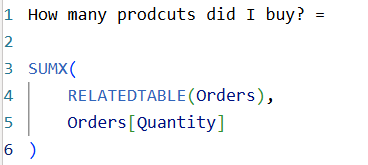
Now my column will return the total of all products across all of a customers orders.
Difference
In summary, RELATED is used when you are looking to retrieve a specific value from another table, while RELATEDTABLE is used for getting a table of values from a related table. With both offering important functions within Power BI and DAX, especially when working with relationships between tables.