


Here, I discuss how I used incremental loading whilst modelling Land Registry's Price Paid dataset. The complete dataset contains a row for every property transaction in England and Wales registered with the Land Registry since 1995 ~ 24 million rows. Land Registry publishes monthly update files that contain new transactions, corrections or deletions.
Rather than having to rebuild a large table whenever a monthly update is released, I wanted a way to only build it once, to then only process the new, monthly transactions.
Incremental loading involves processing only the data that has been added or changed since the previous load. Incremental loading improves data pipeline speed, enabling more real-time analytics, and reduces compute usage.
Incremental Materialisations in dbt
I spell the word correctly unless dbt forces my hand.
In database systems, a materialisation is the way in which the result of a query is stored. E.g., a table physically stores the query result, whilst a view stores only a query definition, which reruns each time the view is called.
Like other materialisations, a model can be materialised as incremental within the configuration block, at the start of the model (can be alternatively done in the .yml file):
{{ config( materialized = 'incremental' ) }}
A table materialisation rebuilds the complete table each time the model is run. An incremental materialisation creates a table on its first run; subsequent runs process a smaller set of incoming rows, which are 'combined' in some way with the existing table.
In my project, I used the following configuration block:
{{
    config(
        materialized = 'incremental',
        incremental_strategy = 'merge',
        unique_key = 'transaction_id'
    )
}}merge strategy compares incoming rows with those from the existing table using the unique_key column. If an incoming transaction ID already exists in the base table, the corresponding row is updated with the value from the new, incoming data. If it does not exist, a new row is inserted.
An incremental model may require different SQL operations when it is first run to when it is subsequently updated. dbt provides the is_incremental() macro for this purpose.
{% if is_incremental() %}

    -- SQL used during an incremental run

{% else %}

    -- SQL used during the initial build

{% endif %}
is_incremental() evaluates to true when:
- the model is materialised as incremental
- the target table already exists
- the model is not being run with
--full-refresh
During the first run, the table does not exist, so the function evaluates to false. During later runs, it evaluates to true, allowing the model to process only the incoming data.
Within an incremental model, dbt can reference the table already created by that model using {{ this }}, which 'points' to the materialised table in the warehouse. A placeholder use of {{ this }} -
{% if is_incremental() %}

    where loaded_at > (
        select max(loaded_at)
        from {{ this }}
    )

{% endif %}
On the first run, the model does not yet exist, so is_incremental() evaluates to false. The filter is therefore excluded from the compiled SQL and the complete source is used to create the table.
On subsequent runs, is_incremental() evaluates to true. dbt then compares the source data with the maximum loaded_at value in {{ this }}, so only rows loaded after the previous run are passed to the merge.
A full refresh can still be forced using dbt build --full-refresh. In that case, is_incremental() evaluates to false, even if the table already exists: dbt rebuilds the model from the source.
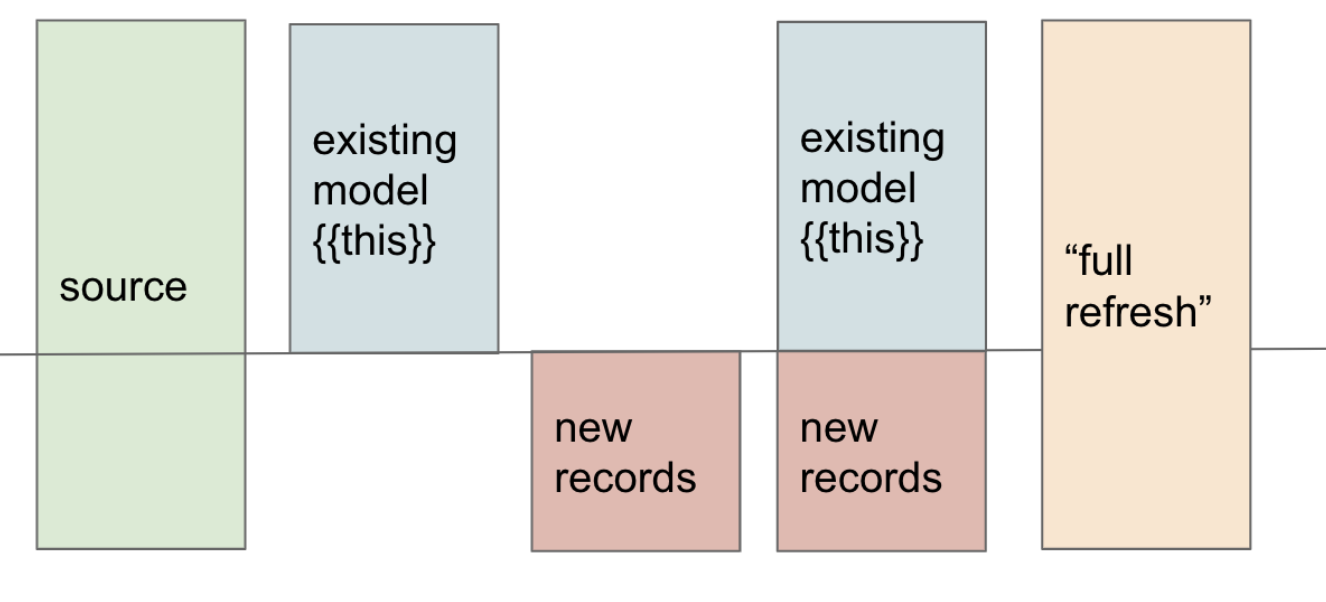
The diagram below summarises this behaviour. During a normal incremental run, new rows are selected and merged into the existing model represented by {{ this }}. During a full refresh, the model is rebuilt from its complete source instead.
Project Overview
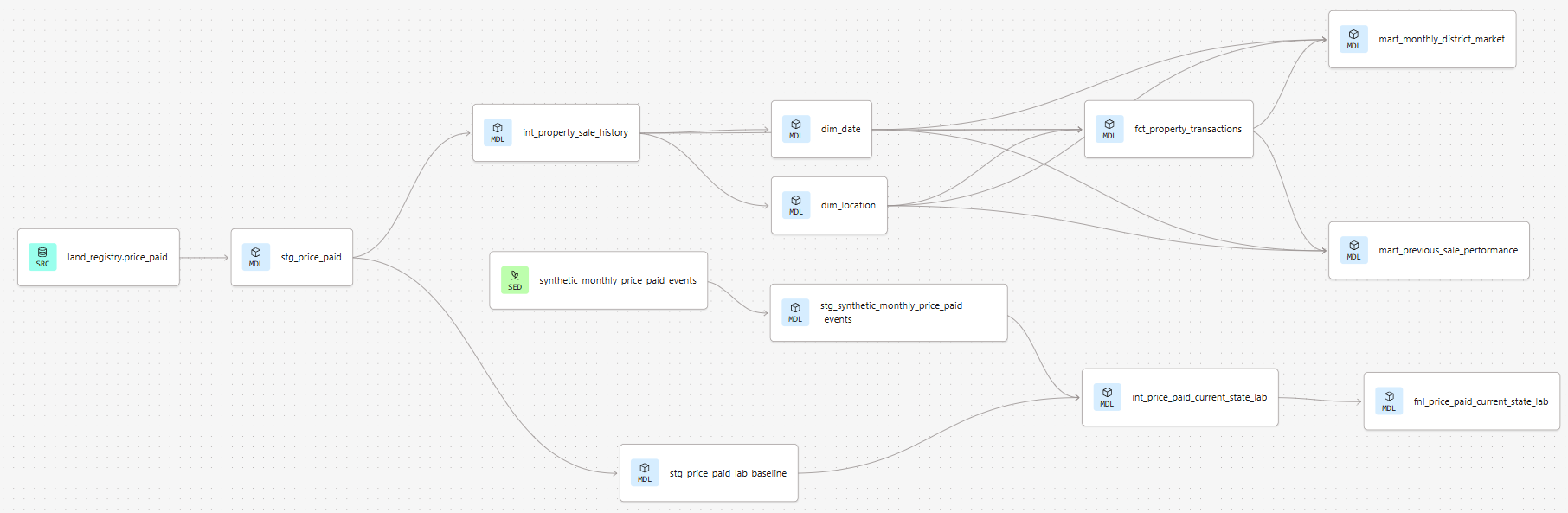
The broader project models Land Registry's Price Paid dataset. The data is transformed through a staging, intermediate (in which business-relevant metrics are derived), a part-normalised and a final, analytical layer (aggregated, so as to perform better in BI tool). Incremental loading (lower portion of the DAG, below) was added so that future updates could be processed without needing to completely rebuild the staging model.
Incrementally Loading Monthly Updates
Land Registry publishes monthly update files containing three possible record types:
| Code | Meaning | Effect |
|---|---|---|
A | Addition | Insert a new transaction |
C | Correction | Update an existing transaction |
D | Deletion | Remove the transaction from the active dataset |
Not wanting to wait until the 20th in order to work with the update file, I created a synthetic set of transactions with two additions, two corrections and one deletion. Having established that the incremental models work as intended with this dummy data, I can now easily change the models to work with future update files.
The small CSV was placed in the project’sseeds directory and committed to Git. After pulling the latest repository version into dbt, it could be loaded into Snowflake using:
dbt seed
For small files, this is considerably easier than loading data manually into Snowflake as no DDL or COPY INTO is necessary.
The relevant portion of the DAG:

int_price_paid_current_state_lab is the incremental model. Starting, first, with the 'inputs' to the incremental process:
stg_price_paid_lab_baselineis a copy of the staged Price Paid dataset.stg_synthetic_monthly_price_paid_eventsis the synthetic, update data.
The incremental model uses transaction_id as its unique_key and applies dbt’s merge strategy:
{{
    config(
        materialized = 'incremental',
        incremental_strategy = 'merge',
        unique_key = 'transaction_id'
    )
}}
The model uses is_incremental() to determine which 'input' to query:
stg_price_paid_lab_baselineis used to create the table initially.stg_synthetic_monthly_price_paid_eventssupplies later update records.
During incremental runs, only records newer than the maximum loaded_at value already present in {{ this }} are selected:
{% if is_incremental() %}

    select *
    from {{ ref('stg_synthetic_monthly_price_paid_events') }}
    where loaded_at > (
        select max(loaded_at)
        from {{ this }}
    )

{% else %}

    select *
    from {{ ref('stg_price_paid_lab_baseline') }}

{% endif %}
New transaction IDs are inserted and corrections update the existing rows. Deletions are handled in the same way as corrections within the incremental model - the existing record is updated so that its latest status become D. Though the Land Registry removes all deleted records from their file, retaining it at this stage helps troubleshoot errrors.
The final model keeps all but the deleted records with logic similar to:
select *
from {{ ref('int_price_paid_current_state_lab') }}
where record_status_code <> 'D'
Testing the Process
After creating the test branch, I first ran a full refresh using dbt build --full-refresh --select int_price_paid_current_state_lab+. Because a full refresh causes is_incremental() to evaluate to false, the model rebuilt from stg_price_paid_lab_baseline; the synthetic transactions were not yet loaded.
I then ran dbt build --select int_price_paid_current_state_lab+. This time, is_incremental() evaluated to true, so the synthetic update data was processed. The intermediate model now contained all five transactions: the three existing records were updated according to the merge logic, while the two new transactions were inserted.
The final model contained four active transactions. The record with a status of D remained in the intermediate model for auditing but was excluded by the final model’s filtering logic, as intended.
I then reran dbt build --select int_price_paid_current_state_lab+ and confirmed that the result did not change. This demonstrates that the process is idempotent: processing the same input repeatedly produces the same final state.
Pipelines may need to be rerun after failures or manual retries. Here, the loaded_at filter prevents an already processed batch from being selected again, while the merge and its unique_key ensure that matching transactions are updated rather than inserted as duplicates.
Conclusion
The core modelling is complete. The incremental process handles additions, corrections and deletions as intended. Next steps are to learn how to automate the ingestion of future update files, rather than manually ingesting into either Git or Snowflake. Snapshots can also be considered to retain a record of all corrections and deletions, rather than just the latest state.