


Today I was tasked with completing Alteryx Challenge 298: Christmas Treasure Box. This challenge started with 3 separate datasets and tasks: choosing the correct value for each based on the given criteria, and, once done, using a lookup table with the correct values to decipher the code and unlock the treasure box. The data sets given were Christmas Cookies, Christmas Music, and Christmas Movies.
I will break down my solutions for each section and explain how I completed the challenge.
Christmas Cookies:
Criteria: Choose the cookie recipe that makes the most cookies!
1. You have 1000 grams of butter and 1000 grams of sugar.
2. The cookie recipes require the ingredients as listed.
3. You are not limited by any of the other ingredients.
Cookie data: Original cookie recipe dataset, showing ingredients per batch and quantity produced

When I read the requirements, I knew my first step was to utilize a formula tool. I needed to find the maximum amount of cookies we could create with the limited ingredients of butter and sugar, depending on which ran out first.
For the formulas, I created a new column “butter max” as: 1000/[butter] and “sugar max” as: 1000/[sugar]. These tell us how many batches we can make from each ingredient on its own.
I then created a “Runs out” column as: if [butter max] < [sugar max] then [butter max] else [sugar max] endif, which gives us the actual number of batches we can make before one ingredient runs out.
Finally, a “Possible Total” column as: [quantity] * [Runs out], which multiplies the batches by how many cookies each batch produces (quantity), giving us the total cookies per recipe.
Cookie formula: Formula tool for calculating butter max, sugar max, limiting factor, and total cookies
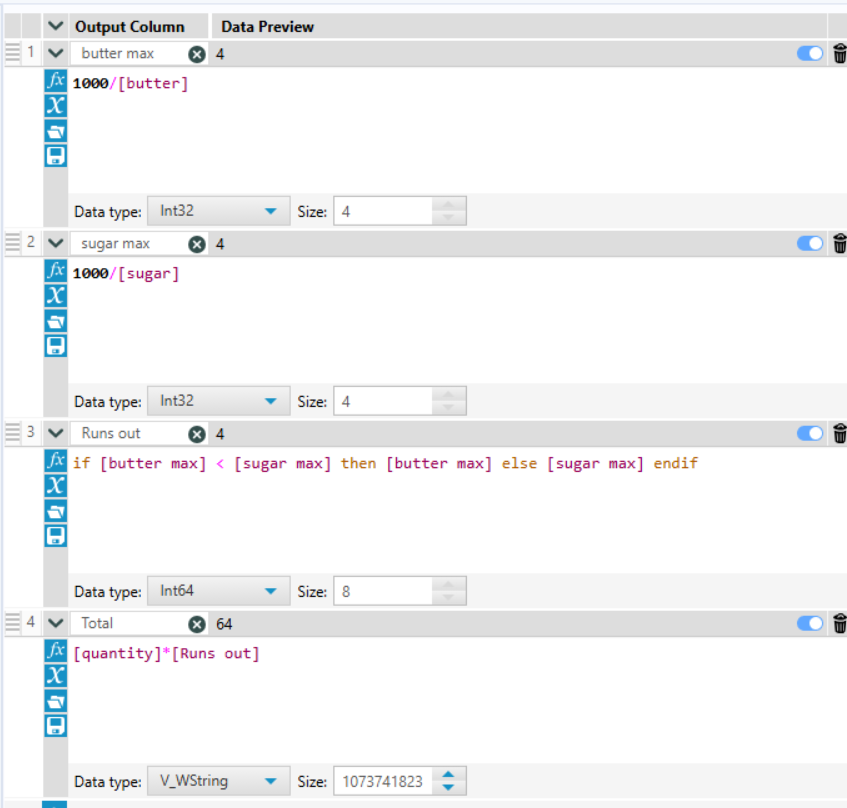
Cookie result: Output showing Sugar Twinkle as the top recipe with 64 total cookies

This formula showed us that we could make a total of 64 Sugar Twinkle Cookies, the most of any cookie. The data was already naturally in descending order.
I then used the sample tool’s first N to select the first row and selected only the recipe name, renaming the column to answer. I renamed it to answer so I could later union all the correct answers and use find and replace to locate the code to unlock the treasure box.
Christmas Music:
Criteria: Choose a Christmas playlist for your guests while you eat cookies!
1. Assume each song is 3 minutes and that your total music playtime will be 45 minutes - this determines how many songs you have on the list!
2. Every song must be a -9 or lower in loudness (ex. -15 would be a very quiet song)
3. Eric wants all the minor songs and Matthew wants songs in F major.
4.Thalita loves Dean Martin!
5. Put the songs in order of loudness, so the music builds as a transition to the movie.
The title of the last song is your "answer"!
Music data: Original Christmas music dataset before any filtering
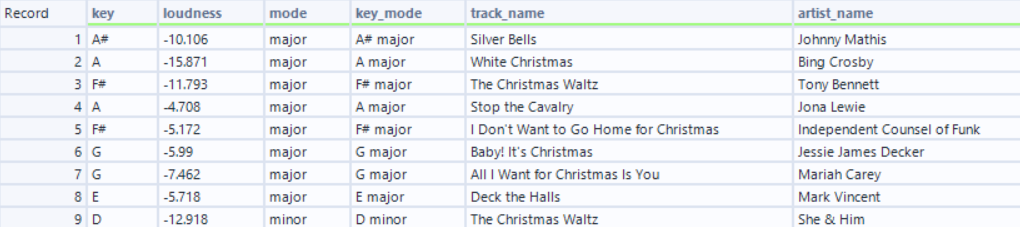
Given these criteria, I knew the first thing I had to do was add a filter to keep songs below -9, as this affects all songs. After this, however, I created 3 separate branches for each specific criterion. I also knew there would be only 15 songs in the playlist, since the total playtime was 45 minutes and each song was 3 minutes.
For Eric, I filtered to only minor songs; for Matthew, only songs in F major; and for Thalita, only Dean Martin songs. After applying these filters, I unioned them back together and sorted them by loudness in ascending order. The total number of songs was already 15, so criterion 1 was already accounted for, and I selected the last row using the sample tool’s last N Rows.
Music union result: Final playlist after unioning Eric's, Matthew's, and Thalita's branches and sorting by loudness ascending.
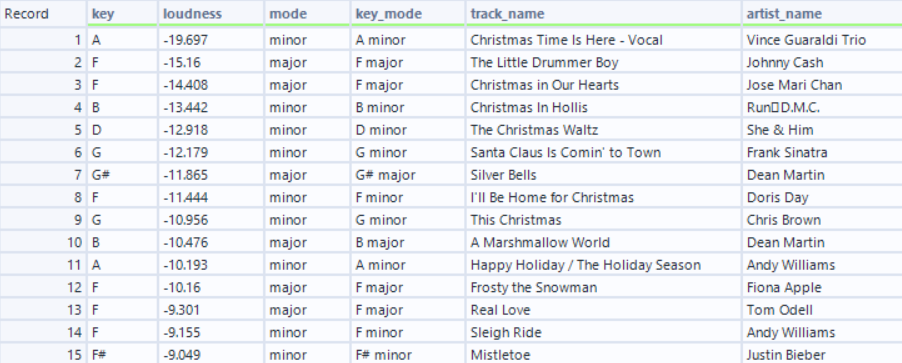
I then used the select tool to choose only the song title and renamed the column to answer. This came out to be the song “Mistletoe” by Justin Bieber.
Christmas Movies:
Criteria:
1. You only want a movie that was released in the theater
2. Nicole doesn't want to watch an animated movie.
3. Ryan is feeling nostalgic and wants to watch something from the 80's or 90's.
4. It must be the top-rated movie of the year it debuted.
5. The movie with the longest run time in the Comedy genre is your "answer"!
Movies data: Original Christmas movies dataset before any filtering
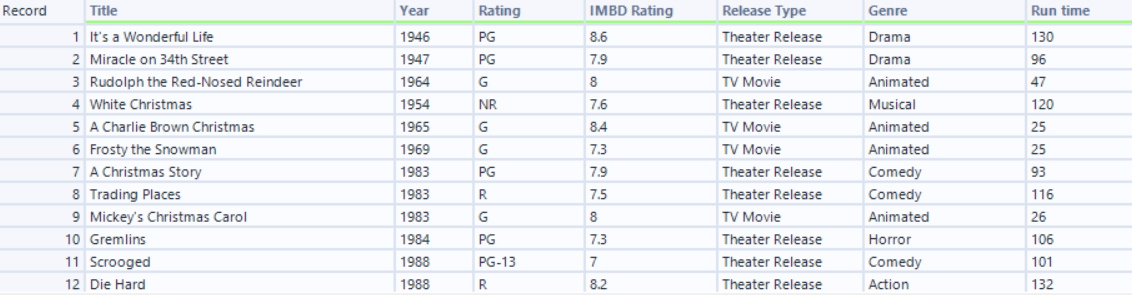
Given these criteria, I knew I had to start with a filter for movies released in theaters only, as well as a filter for non-animated movies. I then created a filter for movies in comedy from the 80s and 90s. I did this with the custom filter
[Genre] = "Comedy" AND ([Year] >= 1980 AND [Year] <= 1999)
To ensure the movie was the top-rated of the year, I created a separate branch from the original dataset and connected it to a summarization tool. Within this tool, I grouped by year, then chose the Max IMDB rating
Summarize configuration: Summarize tool grouping by Year and taking Max IMBD Rating
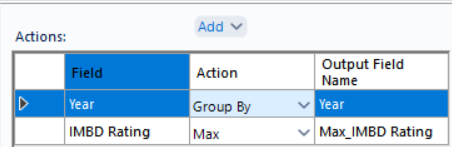
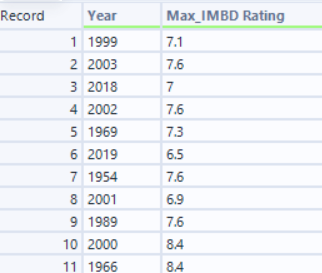
I then took this branch and joined it to my filtered branch, joining on Year = Year. This works as it allows us to know what the actual max IMBD for that year.
Join result: After joining on Year, each movie now shows the max rating for its release year

You can already see, before filtering, that of the remaining movies, National Lampoon's Christmas Vacation was the only one that was also the highest-rated movie of its release year.
To put this into action, I then created a filter to only allow movies where the Rating was the highest for the year, using a custom filter [IMBD Rating] = [Max_IMBD Rating]. This left us with only National Lampoon’s Christmas Vacation. Since there was only one Comedy movie remaining after filtering, it was also the longest-running Comedy by default, satisfying criterion 5. Finally, using the select tool, I only selected the Title column and renamed it to answer.
Unlocking the Treasure Box:
1. Use the provided lookup table to "find and replace" your answers to produce three sets of scrambled letters and numbers (hint: label column as "Answer").
2. Concatenate the key and add to the provided formula tool.
3. Once you run the key through the formula tool, you may open the treasure box and put the link in the tool configuration!
Lookup Table: Mapping possible answers to their coded values
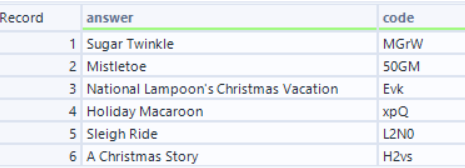
I took all the outputs and connected them to a union tool. Because they all had the same column name, “answer,” there were no issues with appending.
Unioned Data: Output showing our three final answers
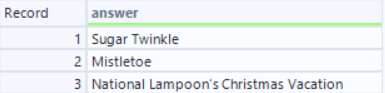
I connected both the union branch and the lookup table to a find-and-replace tool, using the “answer” column as the field and appending to the “code” column. Finally, I added a summarization tool, concatenating the code column with no delimiters, and it gave me the code: MGrW50GMEvk
I plugged the code into the provided formula tool, which generated the URL http://ow.ly/MGrW50GMEvk, and I was excited to see what this link would take me to. I realized it was a YouTube video; however, to my disappointment, it had been either taken down or made private. After doing some digging in the forums, I found that it was a Holiday message from the team that created the challenge.
YouTube screenshot: The treasure box revealed a holiday message from the Alteryx team!


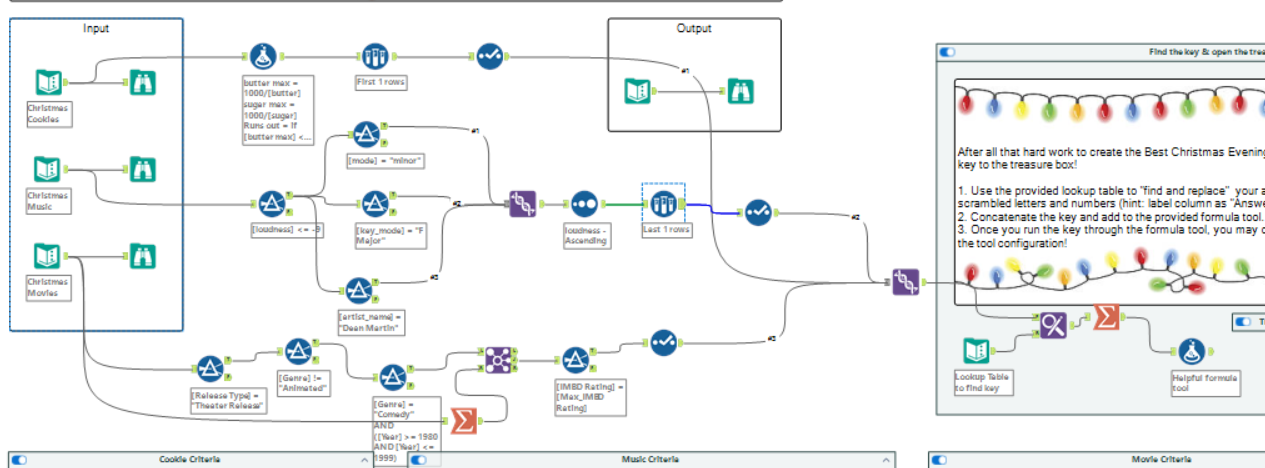
My full workflow: The complete Alteryx flow connecting all three datasets through to the final treasure box output.
Want to try it yourself? You can download my workflow here: Challenge 298 Workflow