


One of the topics covered during our training here at the Data School is on APIs and how we can use that in our work. For the introduction to them in our training and for this blog, different APIs were accessed through Alteryx's Download tool. But to start, we'll need to understand what an API is.
An API is an Application Programming Interface, or a structured method to interact with some application. APIs can be used for two general cases: sending data to a server to receiving data from a server. When it comes to data visualization, APIs can grant a wider range of options for where you can get your data from, rather than relying on flat files.
In the situation for this blog, APIs are structured in an architecture called REST API. This allows us to create a HTTP request to a server to get it to do a task. The task is determined by a method provided in the HTTP request. Some of the methods that can be used are:
| Method | Use Case |
|---|---|
| GET | Retrieve a Resource from Server |
| POST | Insert a Resource on Server |
| PUT | Update a Full Resource on Server |
| PATCH | Update Part of a Resource on Server |
| DELETE | Removes a Resource on Server |
The request sent to the server is then made up of multiple parts: the method and URL, the headers, and the body. The method combined with the URL tells the server what it is that you are trying to do. You can typically find the different possible URL and their methods in an API documentations. The headers provide security details and additional information that the server needs to get its response together, such as what format the response should be in or authentication details. The body then contains the data that the server can then use. In GET requests, there usually isn't a body as you want to receive data rather than send it.
The response returned by the server contains the response details itself as well as some data. In the response details, there is a response code indicating what the result of the request is. The data the response returns commonly comes in the format of an HTML file, a JSON file, or an XML file. The one that we'll be dealing with in this blog is a JSON file.
| Response Code | Example | Meaning |
|---|---|---|
| 1xx | 100 | Informational |
| 2xx | 200 | Success |
| 3xx | 302 | Redirect |
| 4xx | 404 | Client Error |
| 5xx | 502 | Server Error |
In Alteryx, we can use the Download Tool to do an API request. In this blog, we'll be using the Scryfall API documentation to get Magic: The Gathering cards from their server. And important detail when working with APIs is to be aware of rate limits, or how often you can do an API request to their server, and a format for pagination, if the server returns data in pages rather than in bulk, as well as any header requirements, like authentication or response formats. In the case of Scryfall, a User-Agent and Accept header are needed to get a response from the server, and there is a rate limit of roughly 2 requests every second.
Let's see how we can get a random MTG card using the API then. In the documentation, there is a request present that returns a random card, with the possibility for some filters. We can see that the URL for that request is provided in the documentation along with the method used to get it. Since we are wanting to pull information from their server, it would most likely be a GET method.

We can paste that URL into a text input and connect that to the download tool in Alteryx. In the download tool, we can specify the field that we want to use as the URL, making sure that we don't use the Data Connection Manager (DCM) as we can provide the connection source through our field instead. We can see the method under the Payload tab under the configuration window for the download tool. With the field selected and outputting into a field as a string, we need to then make sure that we have the correct headers that the documentations requires from us.
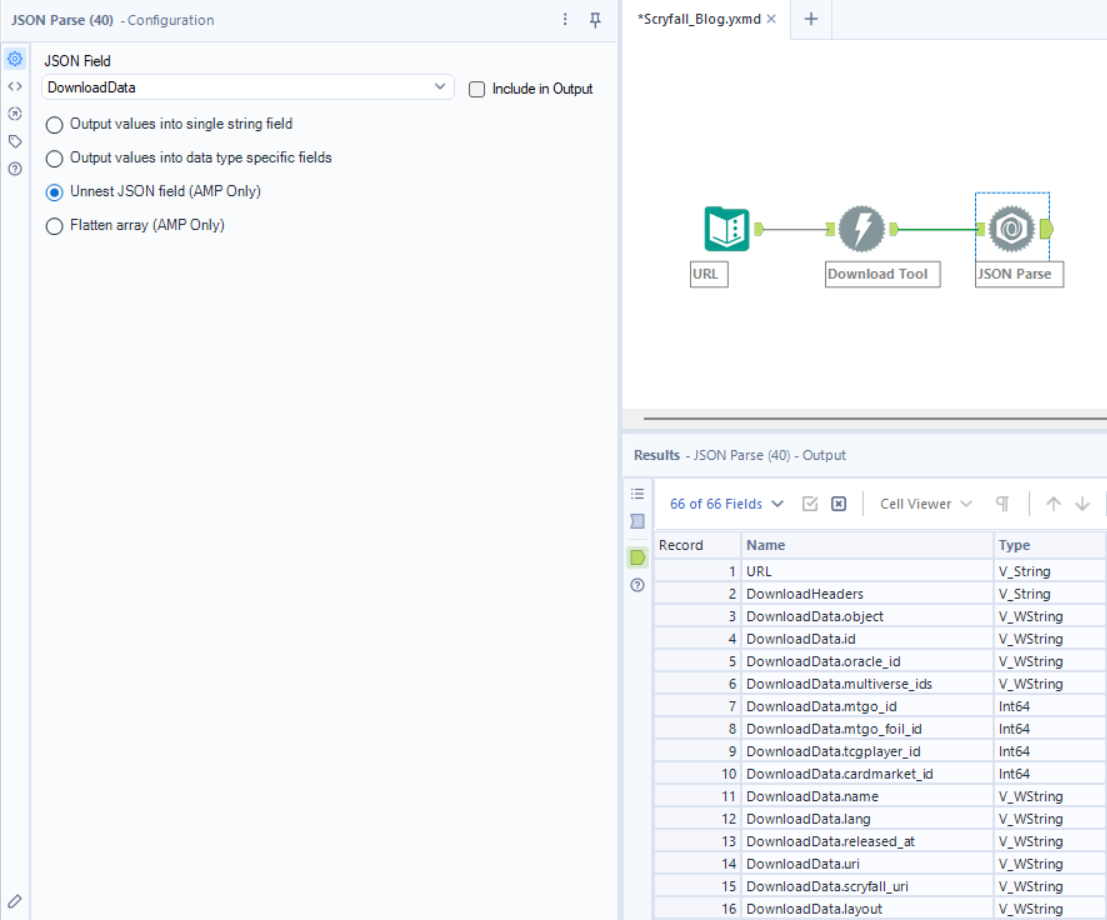
With the URL, method and headers put together, running the flow gives the data we want to see. Two fields are returned: the download data which here is in a JSON format and the download headers which contains the response code. We can then use the JSON Parse tool to unpack the information from the download data field. By using the unnest option in the JSON Parse tool, it splits out the data returned from the API into different fields that can be parsed and used for other outputs.
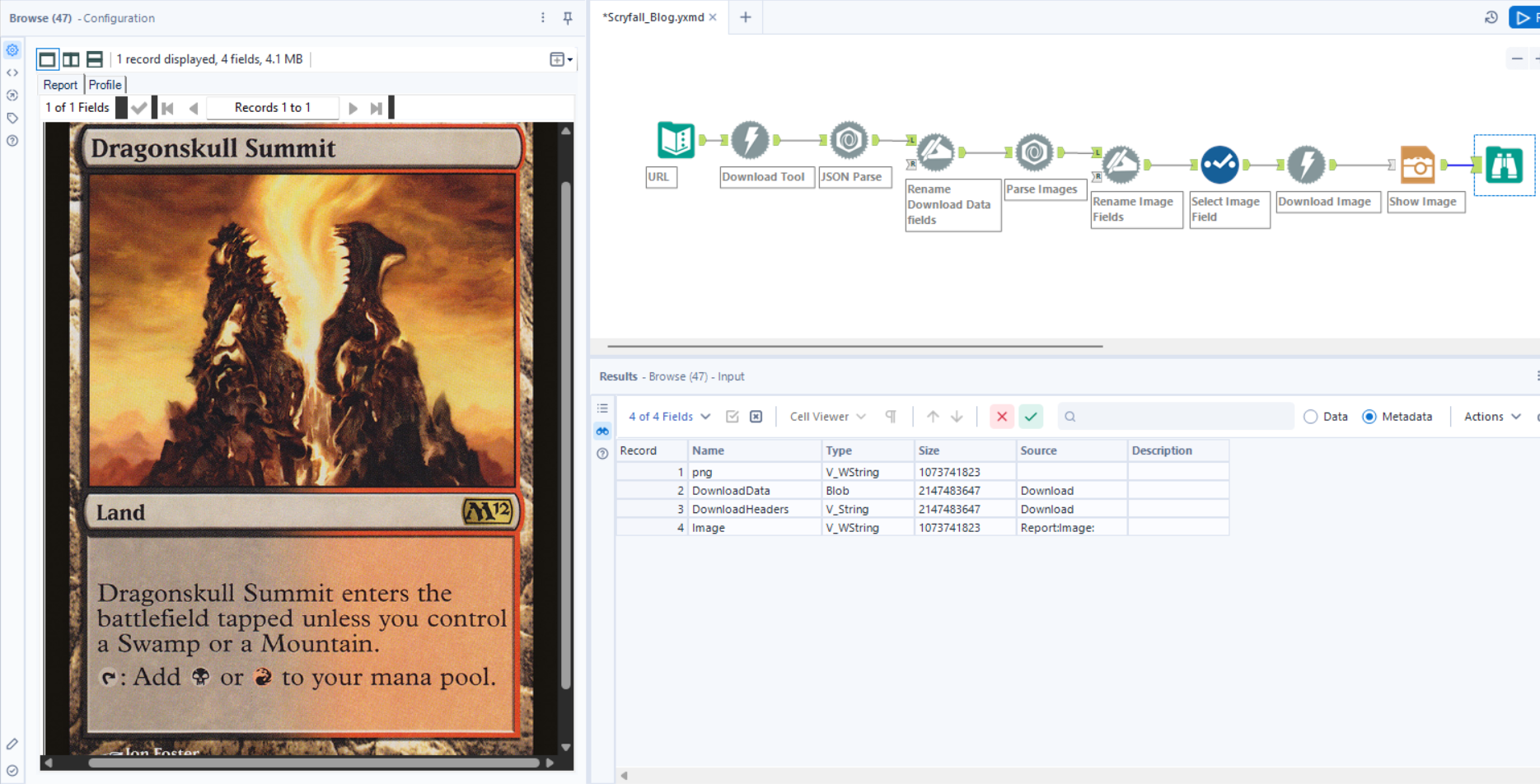
We can use other tools, such as the Dynamic Rename tool, and different reporting tools, such as the Image tool, to show information that's been retrieved from the API. This can be used to eventually output your data for whatever you need the API for. From data visualization to analysis to fun little projects, there's a lot that can be done with APIs.
In this workflow, the data returns the information from a random card. We can dive into the documentation on what is returned with a card to see that a link to an image of the card is returned. We can process the data with some more tools to extend the workflow to eventually show the card itself. This uses another Download tool to download the image as a blob file which can be used in Alteryx in the Image report to show the resulting image.
In the end, there's plenty that can be used with APIs. There's a lot of flexibility with using APIs given the structure that they have with the different methods used to define how we can interact with them. Any good API will have clear documentation on how you can interact with it, with there being plenty of different accessible APIs with and without authentication for whatever project you are working on.