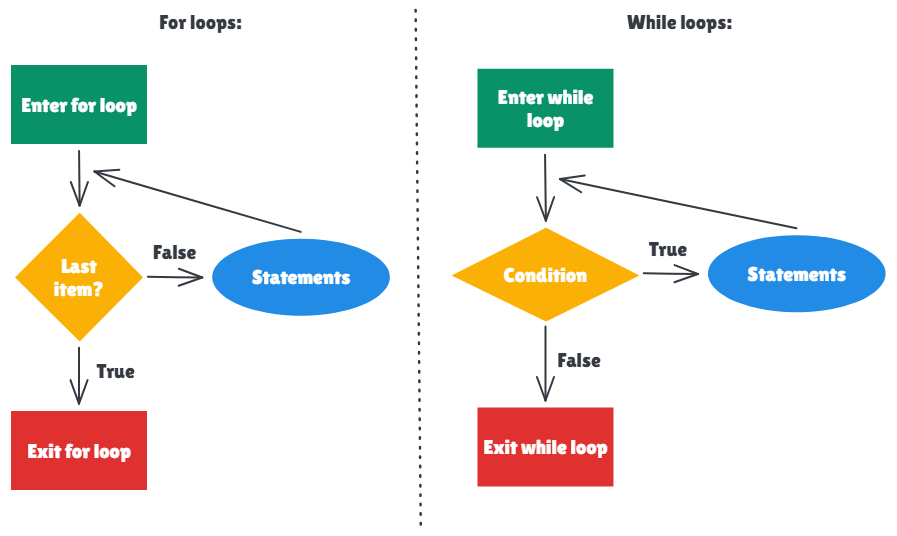
When writing Python, it is often necessary to repeat the same task over and over again. Instead of copying and pasting code, loops can be used to automate the process. There are two main types of loops: For loops and While loops.
Both loops repeat blocks of code, but they are used in slightly different situations. Understanding how they work helps in choosing the right one for a script.
For Loops
What are they and when to use them
A for loop can be used when there is a collection of things (e.g. a list, a folder containing data files, or a string of text), and the code needs to run on every item in that collection. With for loops, it is not necessary to know the exact number of items in advance. Instead, by pointing the for loop at the collection, Python will work its way through, stopping automatically when it reaches the end.
A simple example: Iterating over a list
Here is how a for loop is used to print out a list of fruits.
fruits = ['apple', 'banana', 'cherry']

for item in fruits:
    print(item)
Line-by-line explanation:
fruits = ['apple', 'banana', 'cherry']: Defining a list containing three text strings and saving it in a variable named fruits.for item in fruits:: The loop setup which tells Python to look at the fruits list. The word item is a temporary variable which allows Python to grab the first thing in the list ('apple'), put it inside the item variable, and start the loop.print(item): Python prints whatever is currently inside the item variable (which is'apple'). The loop then jumps back up to the top, grabs the next thing in the list ('banana'), puts that into item, and runs the print statement again. It loops through the list until it runs out.
The Fibonacci sequence and the For loop
During Python training, we were asked to code the Fibonacci sequence using loops. As it can be done in so many different ways, it serves as a good way to illustrate the difference between while and for loops. Here is one way a for loop can be used to code it.
For context, the Fibonacci sequence is an infinite mathematical sequence where each number is the sum of the two preceding ones (0, 1, 1, 2, 3, 5, 8...).
To generate a specific target number of sequence elements (10 of them), a for loop can be combined with Python's range() function, which generates a collection of numbers that can be used to loop through.
a = 0
b = 1
for step in range(10):
  print(a)
  next_num = a + b
  a = b
  b = next_num
Line-by-line explanation:
a = 0andb = 1: Setting up the first two Fibonacci numbers in independent variables, which is always 0 and 1.for step in range(10):: Therange(10)function gives a list of 10 items to loop through. The numbers inside the range don’t matter, the goal is to make the loop run 10 times. A temporary variable named step keeps track of the current iteration.print(a): This prints the current value of a.next_num = a + b: This calculates what the next number in the sequence is by adding the current two numbers.a = b: The variables slide forward. The old b becomes the new a.b = next_num: The newly calculatednext_numbecomes the new b. The loop then jumps back up to the top to run the next step, repeating 10 times.
A more complicated example: Looping through a dictionary
Data often comes in pairs, like a dictionary of student grades. Here is how a for loop checks conditions inside those pairs.
grades = {'Finn': 85, 'Jake': 92, 'Marceline': 78}

for student, score in grades.items():
    if score >= 90:
        print(f"{student} got an A!")
Line-by-line explanation:
grades = {'Finn': 85, ...}: This creates a dictionary where the keys are student names and the values are their test scores.for student, score in grades.items():: The.items()method pulls out both the name and the score at the same time. Two temporary variables are created here: student gets the name, and score gets the number.if score >= 90:: Before printing anything, the current student's score is checked to see whether it is 90 or higher.print(f"{student} got an A!"): If the condition is met, a formatted string with the student's name is printed.
While Loops
What are they and when to use them
A while loop works differently. Instead of going through a set collection of items (like a list or a file), a while loop looks at a rule. It will keep running the same block of code over and over again as long as that rule is true. As soon as the rule becomes false, the loop stops.
This is used when waiting for something specific to happen. For example, waiting for a number to reach a certain limit, or waiting for a user to type the right password.
A simple example: A Countdown
Here is a basic countdown timer.
countdown = 3

while countdown > 0:
    print(countdown)
    countdown = countdown - 1

print("Takeoff!")
Line-by-line breakdown:
countdown = 3: This sets the starting countdown variable to 3.while countdown > 0:: This is the while loop rule. Python checks: is 3 greater than 0? Yes. Because the rule is true, the loop starts.print(countdown): It prints the current number (3).countdown = countdown - 1: This takes the current value of countdown (3), subtracts 1 from it, and saves the new value (2) back into the variable. If this change isn’t included, the loop would infinitely repeat.print("Takeoff!"): Once the countdown reaches 0, the rule 0 > 0 is false, and the while loop is no longer used. Python then moves to this final line.
The Fibonacci sequence and the While loop
Coming back to the Fibonacci sequence example, a while loop unlocks different use cases. Instead of asking for exactly 10 Fibonacci numbers, what if the goal is to find Fibonacci numbers that are less than 50? The exact amount of numbers is unknown, so a collection-based for loop wouldn’t make as much sense here. A while loop is perfect as a rule can simply be set.
a = 0
b = 1

while a < 50:
    print(a)
    next_num = a + b
    a = b
    b = next_num
Line-by-line breakdown:
a = 0 and b = 1: This sets up the first two Fibonacci numbers in independent variables.while a < 50:: Python checks the rule: is the current value of a less than 50? If it is, the loop runs.print(a): This prints the current value of a.next_num = a + b: This calculates what the next number in the sequence is by adding the current two numbers.a = b: This slides the variables forward. The old b becomes the new a.b = next_num: The newly calculatednext_numbecomes the new b. The loop then restarts at the top, checking if the new a is still less than 50.
A more complicated example: The break statement
Sometimes a while loop needs to run forever until a specific event forces it to stop. This can be done by using while True combined with a break command. Here is how to find the first number greater than 100 that is divisible by both 7 and 5.
number = 101

while True:
    if number % 7 == 0 and number % 5 == 0:
        print(f"Found it! The number is {number}")
        break
    number = number + 1
Line-by-line breakdown:
number = 101: Define the search to start at 101.while True:: Because the word True is always true, this loop has no natural stopping point.if number % 7 == 0 and number % 5 == 0:: The modulo operator (%) checks for remainders. If dividing by 7 leaves a remainder of 0 AND dividing by 5 leaves a remainder of 0, the condition is met.print(...): Print the success message.break: This is how to exit out of the loop. When Python runs break, it stops running the loop.number = number + 1: If the if condition was not met, the code skips the break, adds 1 to the number, and loops back up to try again.
Summary
Choosing between these two loops usually comes down to whether the code is dealing with a collection of items or waiting for a rule to change.