


Ever heard of work smarter, not harder? Alteryx has a tool which fully encapsulates this saying. The Multi-Field Formula tool is essentially a superpower for anyone dealing with wide datasets. Instead of treating your columns like individual fields, it allows you to treat them as a collective. If you have twenty columns that all need the same %-increase or ten text fields that need the same TRIM function, you write the logic once, and the tool iterates through the rest.

The Tool
The Multi Field Formula Tool lets you perform functions on multiple fields simultaneously and gives you 'access' to [_CurrentField_], [_CurrentFieldName_],[_CurrentFieldType_]. By using the [_CurrentField_] variable, you’re telling Alteryx: "Whatever column you’re looking at right now, do this to it."
The Configuration
When you connect the Multi Field Formula tool, this configuration window will pop up on the side of your screen:
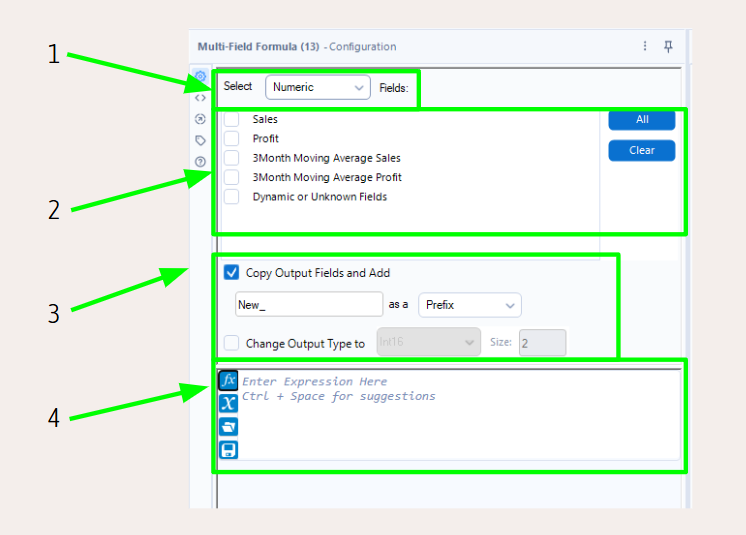
- It first prompts you to select the data type of the fields the formula will be applied to. Whatever you choose here will then populate the second step with the data fields of that type.
- As mentioned in step 1 this is populated by all fields in your dataset of the selected type. Here you select the fields the formula will be applied to.
- You then define the output field. You can choose whether to create new output fields with a suffix or prefix (copy output fields and add) or whether to just update the existing fields (untick copy output fields and add). You can also change the data type (tick change output type to and select data type) and its size.
- And lastly, you can write the formula. Remember: you can refer to [_Current Field_], [CurrentFieldName], [_CurrentFieldType_]
The great thing about the Multi Field Formula Tool is that you can use any formulas (just like you would with the formula tool) but actually change several fields at once. Try it out!