


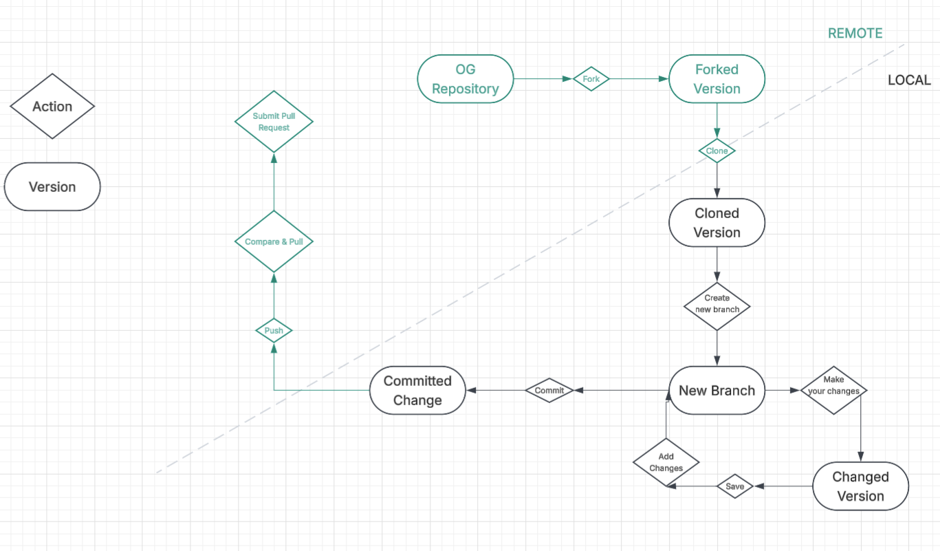
The git workflow is a set of rules and practices that determines how changes are branched, merged, and delivered across the software lifecycle. I made a git cycle diagram to understand this git workflow – from seeing a repository you are interested in to making your own changes and uploading these to your own repository.
Fork
When you see a repository on GitHub that you would like to contribute to / edit, forking copies this repository to your remote account. Note: It does not copy the repository to your local machine.
Clone
If you want a copy of the forked repository on your local machine you need to clone it. To do this you go into forked repository, select the green ‘Code’ button and copy the url.
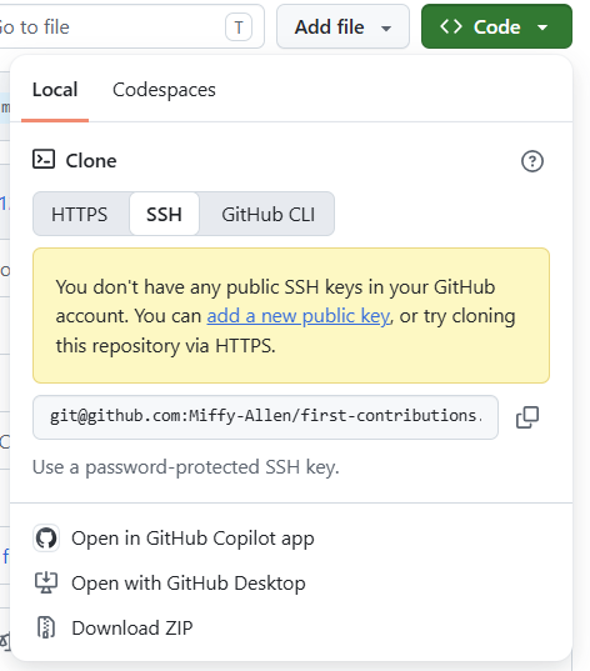
Open a terminal and type:
git clone >url<
Create new branch
Make sure you’re in the correct directory (a.k.a., the cloned repo) for this next step. Next you want to create a new branch to apply your changes to. Its good practice to create a branch separate from your ‘main’ branch when making edits. To do this type in the terminal:
git switch -c branch-name
Add changes
Now in your new branch you can make your changes. To add your changes to your branch make sure you save and then run:
Git add .
Commit
After you have added your changes you can ‘commit’ them. You should do this fairly frequently as it gives you a record of your changes in GitHub. In the terminal type:
Git commit -m ‘commit message’
Git push
Once you’re happy with your changes and have saved/added/committed these you want to push these changes back up to your remote repository in GitHub. To do this run:
Git push origin branch-name
‘Origin’ signifies you want your changes on the remote repository.
Compare & Pull
Now you want to return to GitHub and you should see a ‘Compare & Pull Request’ button in green. Once you select this button you can add a title and description of your pull / merge request.
Create Pull Request
Then select the ‘create pull request’ button to merge your local with your remote!