


As businesses continue to collect more data, the challenge isn't just understanding that data but knowing how to turn it into meaningful decisions.
With recent advancements in artificial intelligence (AI), business intelligence platforms are evolving to make analytics more accessible and actionable.
One example of this evolution is Salesforce's Tableau Next.
What Is Tableau Next?
Tableau Next is an end-to-end, agentic analytics platform built on Salesforce that brings together data, analytics, and AI-powered capabilities to help organizations make better business decisions.
While Tableau Desktop primarily focuses on building and exploring visualizations, Tableau Next introduces a broader approach called agentic analytics. This allows AI-powered agents to help users explore information, identify trends, and take action based on insights.
The platform incorporates several key components:
- Data 360: Connects and unifies data from different sources.
- Tableau Semantics: Establishes consistent business definitions, metrics, and relationships.
- Visualizations & Metrics: Allows users to build interactive dashboards and monitor business performance.
- Agentforce: Provides AI-powered assistance to help users explore data, answer questions, and support business decisions.
How Can Businesses Use Tableau Next?
Tableau Next creates opportunities for organizations to bring analytics more directly into their everyday workflows.
For example, a Sales Manager could monitor regional performance, identify declining sales, and investigate potential causes. Customer service teams could analyze case trends and identify recurring issues, while leadership teams could monitor key performance indicators (KPIs) across departments.
Through its integration with Salesforce and AI capabilities, Tableau Next can also help organizations move beyond traditional reporting by bringing relevant insights into the applications where employees already work.
Final Thoughts
Recently, I had the opportunity to explore Tableau Next by rebuilding a Regional Performance Dashboard using Superstore data.
While the development process differs from Tableau Desktop and comes with a learning curve, it was interesting to explore how semantic models, metrics, parameters, and visualizations fit together within the platform.
I did run into a few challenges during the dashboard build, particularly when setting up the metrics. The requirement to configure a time dimension made the process a little more difficult than expected. Although I was able to get the metrics to display in their individual views, I couldn't get them to display properly once they were added to the dashboard.
You can see this in my finished dashboard below, particularly in the KPI section across the top.
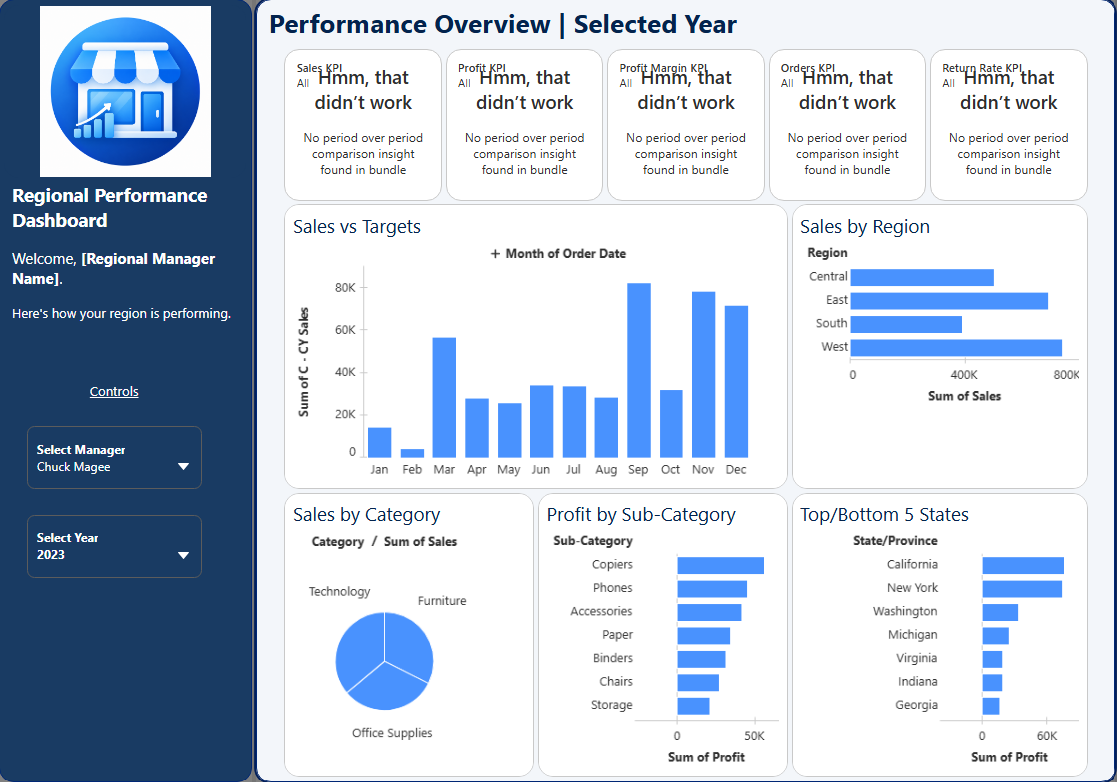
Although I still prefer Tableau Desktop for dashboard development, I can see how Tableau Next could become a valuable platform for businesses looking to combine analytics, AI, and everyday decision-making.
Thanks for reading, and I hope you learned something new about Tableau Next and how businesses can utilize it!