


Modularising code is a powerful concept in Python. This concept is basically breaking apart your code into reusable blocks that are general and applicable across different use cases.
Of course this isn't suitable for all parts of code, but by putting them into functions, this helps with readability, deduplicating code, testing and debugging, and simplified maintenance.
Let's go with an analogy of a LEGO car:
- The car is build up of different types of bricks (your lines of code)
- You just have that car to work with, no crazy big build (readability)
- It fits in the garage of your LEGO house, or the streets of your LEGO city (your projects)
- If there are any broken pieces or you want to swap out the colours, you can do so without affecting your LEGO house or the streets (debugging)
Though it's not a perfect example, you can kind of get the gist!
Logging Function
A reason why we might make logging a function is to deduplicate lines of code. For example, in our BikePoint project, we have 2 separate scripts.
- To extract the data (Script 1)
- To load the data into our S3 bucket (Script 2)
Logging is good practise! It's important to log the progress and errors that occur to troubleshoot if we need to do so down the line.
So this means at the top of our scripts we have the same block:
logtimestamp = datetime.now().strftime('%Y-%m-%d')

log_dir = 'logs'
os.makedirs(log_dir, exist_ok=True)
log_filename = f'{log_dir}{logtimestamp}.log'

logging.basicConfig(
    filename = log_filename,
    format = '%(asctime)s - %(levelname)s - %(message)s',
    level = logging.INFO
)

logger = logging.getLogger()
logger.info('logger was successfully initialised')
Another advantage of modularising code is that you can define a variable that may be used multiple times across the code, (which also includes multiple functions).
In Script 1 and Script 2, the 'logtimestamp' is being calculated again which we can avoid. For example, if we have 20 scripts, just calling the function will save time in the long run, and also ensure consistency across scripts.
I'll be breaking down the different sections of the code:
Just before you start!
- Set up a folder where all of your functions will live, 'modules' is what we use
- Name your file sensibly, as this is what you will be referencing
- Move your file into that folder
Packages:
You'll need to install the required packages into the function. Though it might seem logical to just install the packages on the main script, don't forget that the advantage is that this becomes it's own functional piece that can be used in other scripts.
import logging
import os
Setting up the function:
You define the function by stating 'def', then give the function a name. You will then need to include any variables in the brackets (stuff that you or other people can customise), and then add a colon.
def logging_setup():Deciding on variables:
The easiest way to 'choose' what will be going into the variables is to look at what might be hardcoded, and what you might want to change.
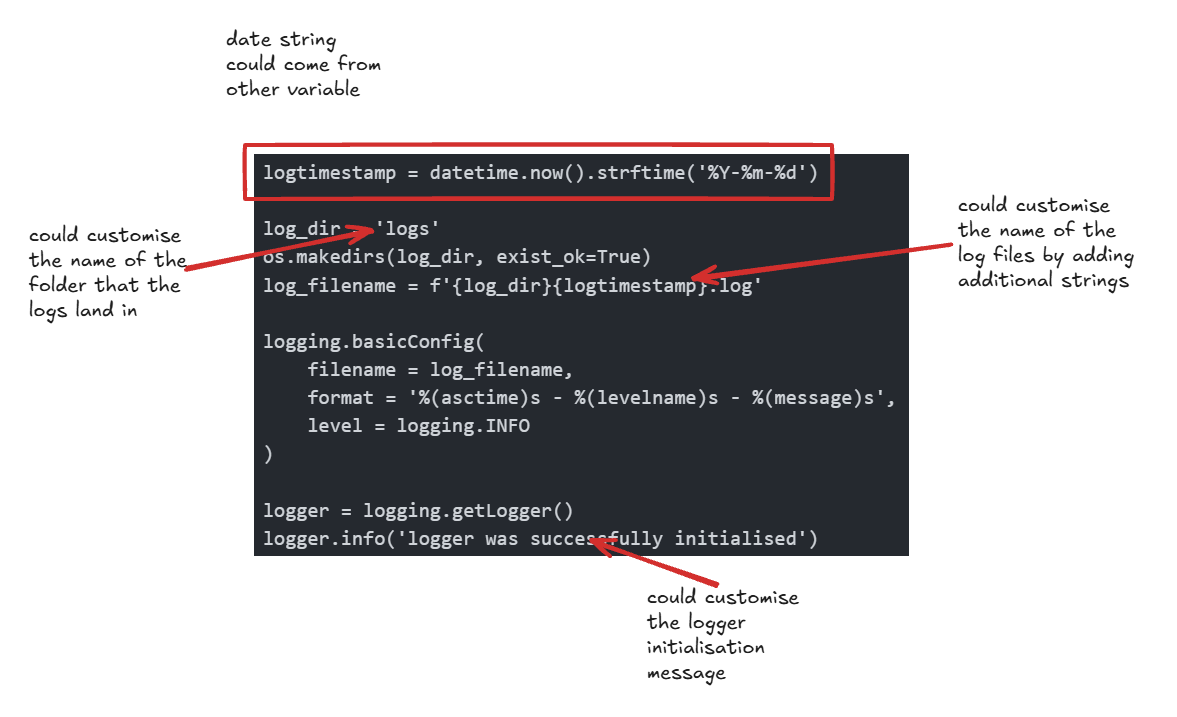
This is just an example of what you could add, and it is not limited to this!
Since I know my code uses a timestamp using datetime.now() in the API call I'll be adding that into my variables, and also adding an option to change the log directory if I reuse this code in another project.
So now my def string looks like this:
def logging_setup(log_dir:str, timestamp: str):So since log_dir and timestamp will now be supplied in the main code, we no longer need to define them within the initial code.
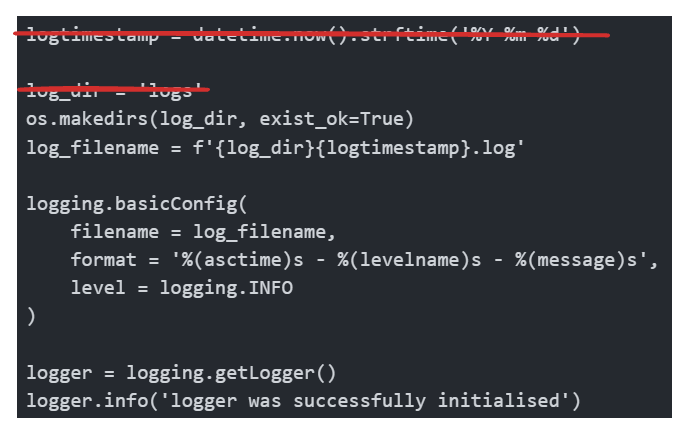
With those removed, my code now looks like this:
import logging
import os

def logging_setup(log_dir:str, timestamp: str):
    os.makedirs(log_dir, exist_ok=True)
    log_filename = f'{log_dir}/{timestamp}.log'

    logging.basicConfig(
        filename = log_filename,
        format = '%(asctime)s - %(name)s - %(levelname)s - %(message)s',
        level = logging.INFO
    )

    logger = logging.getLogger()
    logger.info('logger was successfully initialised')
Project considerations
If you remember earlier, I mentioned how this project has 2 scripts and that is the reason why there is duplicated lines of code for the logging setup. So by applying this mindset, we can also create functions out of those two scripts and run them in one script one after the other (as Python reads top-down code).
With the BikePoint files, I want the file names to have the exact time stamp, since this will allow me to track bike parking over time. However, this means a new log file is made if I take the main timestamp variable that I defined in the function.
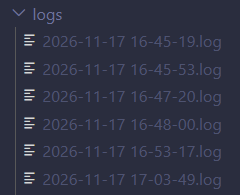
So I'll be adjusting the code in the logging function to counteract that, while allowing the actual file to have the exact time stamp still (see line 6).
import logging
import os

def logging_setup(log_dir:str, timestamp: str):
    os.makedirs(log_dir, exist_ok=True)
    log_timestamp = timestamp.strftime('%Y-%m-%d')
    log_filename = f'{log_dir}/{timestamp}.log'

    logging.basicConfig(
        filename = log_filename,
        format = '%(asctime)s - %(name)s - %(levelname)s - %(message)s',
        level = logging.INFO
    )

    logger = logging.getLogger()
    logger.info('logger was successfully initialised')
Of course this means I'll be writing another variable, but I've only had to write that once, instead of across two scripts, AND I can use it in completely unrelated projects!
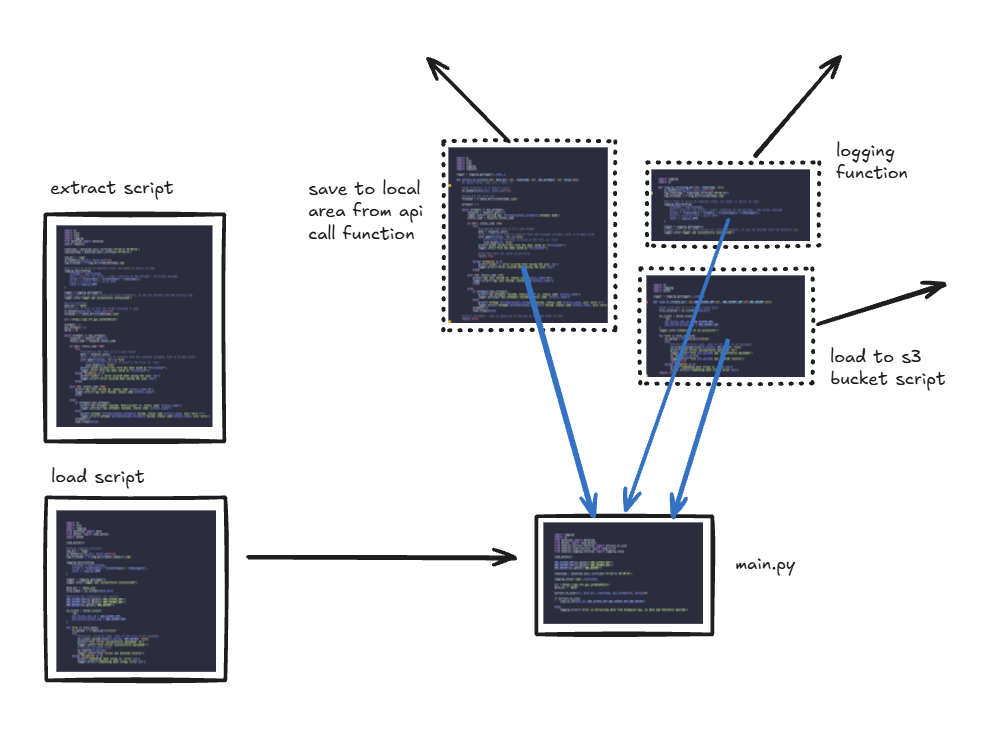
So now if I want to automate the script, I don't need to link two scripts together, I can have one file run which does everything!
Putting it back in
In order to user the function, you'll need to call on it.
So now I'm asking Python to look in the modules folder and look at the logging_function.py file I have in there. And then I'm calling on the logging_setup function that I defined above!
from modules.logging_function import logging_setup

#installing all other packages and libraries
#establishing any variables

timestamp = datetime.now().strftime('%Y-%m-%d %H-%M-%S')

logging_setup('logs',timestamp)
I'll just bring the function definition down here so you can see how the previous code works:
def logging_setup(log_dir:str, timestamp: str)

logging_setup('logs',timestamp):
You can use predefined variables or hardcode into the function as long as it follows the structure!
Key takeaway is...
My example was quite a simple one to do (which you can also copy to use in your project, just make sure that the input timestamp is a date), but when you have much more complicated scripts and more functions, it can save time in the long run building your own library of functions you can call upon!
Happy Coding!
Full logging script
import logging
import os

def logging_setup(log_dir:str, timestamp: str):
    os.makedirs(log_dir, exist_ok=True)
    log_timestamp = timestamp.strftime('%Y-%m-%d')
    log_filename = f'{log_dir}/{timestamp}.log'

    #don't have to write on separate lines, but makes it easier to read
    logging.basicConfig(
        filename = log_filename,
        format = '%(asctime)s - %(name)s - %(levelname)s - %(message)s',
        level = logging.INFO
    )

    logger = logging.getLogger()
    logger.info('logger was successfully initialised')