


What are dimensions and measures in data? How do I know which is which in Tableau?
Dimension and Measures are the columns that make up a data table.
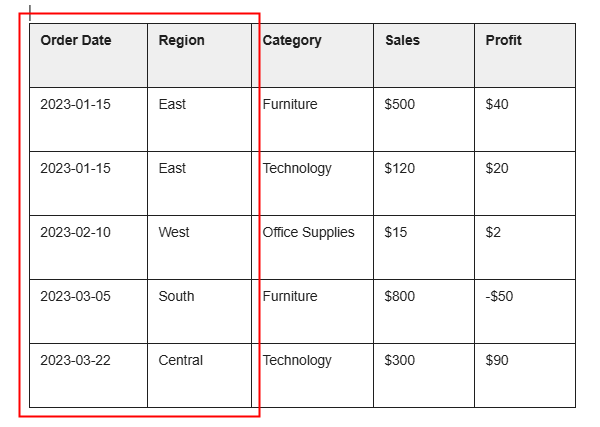
A column acts as a 'dimension' when it records a feature of the data. It's a label, of sorts, that describes something about a single row, in a non-measurable way.
In Tableau's Superstore dataset, Order Date, Region, and Category are all dimensions.
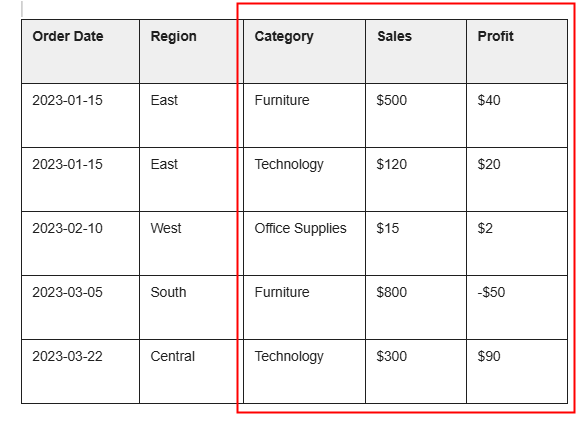
Like its name suggests, a 'measure' measures a quantifiable aspect about a single entry. A rather circular definition. Alternatively, it is the kind of information one can only obtain through methods like counting, measuring, weighing, gauging, and recording it down as a number. Sales and Profit are Measures
Think of Dimensions and Measures like adjectives. If I were to talk about pet birds, I might say something like:
'I have an 8-foot, yellow, fuzzy bird' and 'I have a 9-inch, blue, velvety bird'.
I might put these birds into a bird table. A single row represents my object. Labels like 'blue' or 'fuzzy' describe the features of the object, but '8-foot' and '9-inches' give us an understanding of magnitude.
Since dimensions are the labels by which you can group your rows for aggregation, when analyzing data you can only 'travel' in one direction from coarse granularity to fine granularity. Dimensions must be evaluated for an aggregation that is more nuanced than a simple Sum of Total or Average of Total, and so on.
In short, understanding the nature of your data through aspects like its composition of dimensions and measures will prove useful when you think about data cleaning or analysis.