


If you have ever worked with data before, you probably remember going to a site to download a file (perhaps it was an excel file or a csv). At the time that we obtain this file, it has already traveled through a journey of transformations before making its way into our downloads folder.
It is almost certain that between the time of its collection and its touch down onto your personal computer, that it was manipulated using SQL.
What is SQL?
SQL (Structured Query Language) is the language used by users of data to manage and manipulate that data stored in databases.
We can use SQL to make a query to a database. We 'asks' the database to return to us a single table, built to the specifications that we define in our 'ask'.
This table that we get can be:
- a full copy of a single table living in the database
select *
from table_name- a subset of that table
-- truncating the columns returned
select
  column_1,
  column 2
from table_name
-- truncating the rows returned
select *
from table_name
where [condition = true]- or even a new table built from combining multiple tables on some kind of relationship (done by joining or unioning tables).
How do we construct a SQL query?
A SQL query is composed of a combination of key words that tell the database what kind of data to retrieve. They are:
SELECT - "in my output, show me these columns"
FROM - "look for them in this table"
WHERE - "filter out these specific rows based on a condition"
GROUP BY - "aggregate the rows on this granularity"
HAVING - "filter out these aggregations based on a condition"
ORDER BY - "sort these results"
Lets Practice!
Lets say we have two tables sitting in a database:
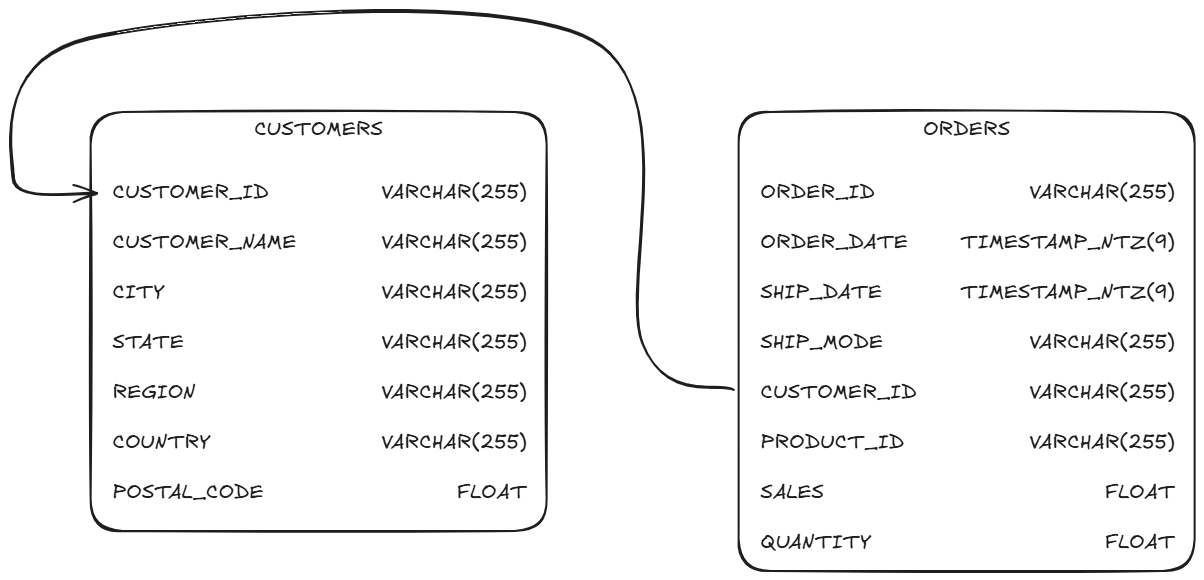
In order to just get a list of customers, we could just ask the database:
select *
from customers
;
you could read this as:
"in my output, show me all columns from the customers table"
here, the star (*) translates to "all columns".
Our output would look something like this:

If we only wanted to get a list of customer names and their zipcodes, we could ask the database:
select
  customer_name,
  postal_code
from customers
;
which we would read as:
"in my output, just show me customer_name and postal_code from the customers table"
and our output would look like this:

It begins to get more interesting when we can start picking and choosing the kinds of rows we want to see.
If, for example, we wanted to see the names and zipcodes of people whos zipcode was less than 40000, we would ask the database:
select
  customer_name,
  postal_code
from customers
where postal_code < 40000
;
which we could read as:
"in my output, just show me customer_name and postal_code for the rows where postal_code is less than 40000"
and we would get:

Because we are now placing a restriction on our output, expect to see less rows that the full size of the table. All the rows in the original table that did not make the cut do not get outputted.
In the next post, we will go over creating new tables by combining existing tables together with SQL!