


During our recent training, something that I found particularly confusing were the differences in data modeling between Tableau and PowerBI . I created this blogpost to help others who might have similar struggles.
The nomenclature
The first hurdle is the difference in nomenclature. For data modeling, we need to know the following distinction:
Joins
Combining two tables on a common ID, thereby expanding it horizontally, is called a join in SQL and Tableau. This is called merge in PowerBI.
Unions
Combining two tables on common columns to expand it vertically is called union in SQL and Tableau. In PowerBI this is called append.
The Star Schema
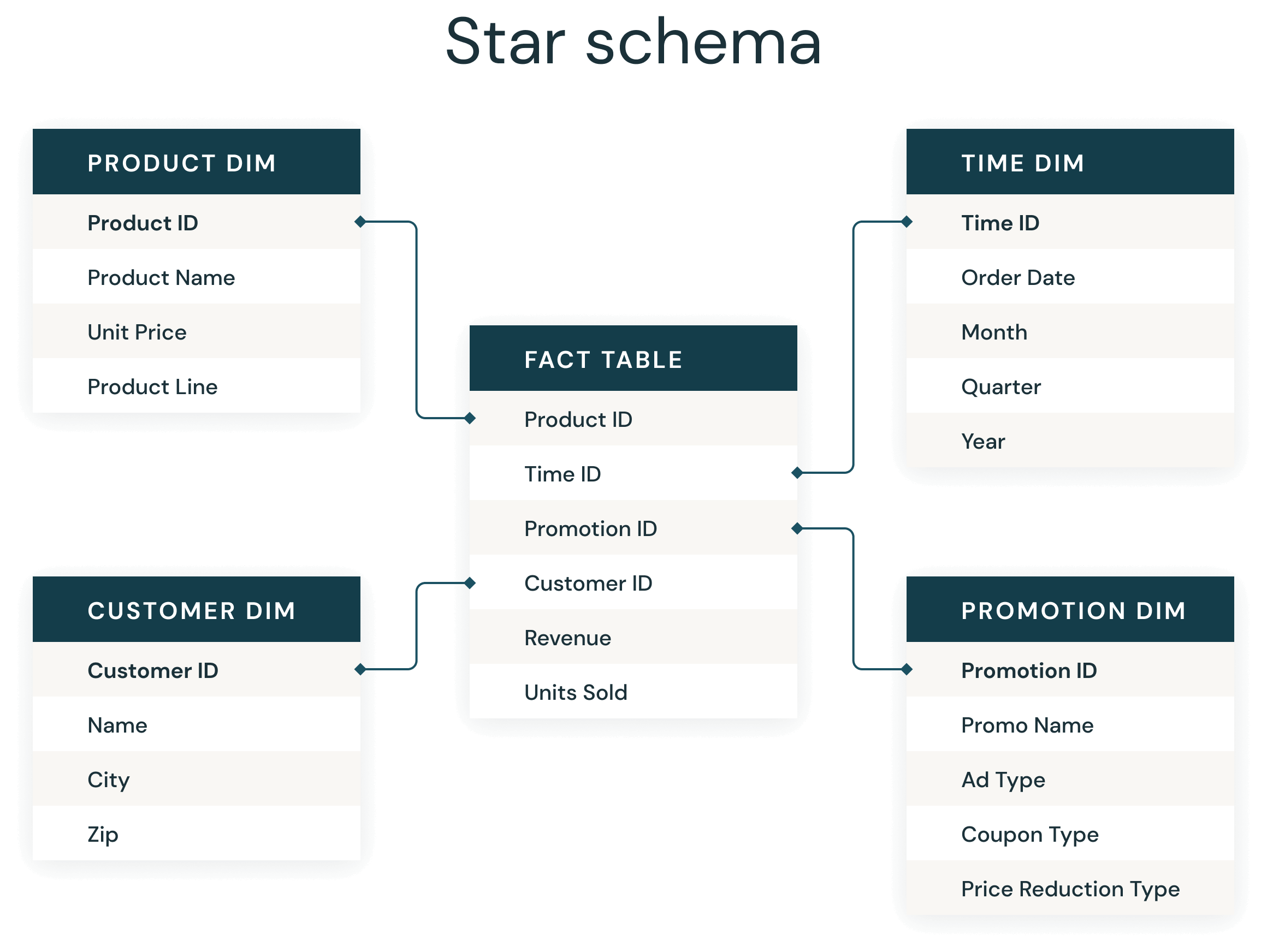
Before talking about the tools, it is helpful to understand the concept of the star schema. Data is mostly arranged into fact and dimesion tables.
- A dimension table contains one row per key item. Let's say, it gives the name of the manager for each store. We use dimension tables to avoid redundencies in our data. Since the store manager is always the same person, it is better to store that information in one separate table and use a key column, like the store name, or a strore-ID to reference the data.
- The facts table contains the actual data that we are interested in, like the sales of the store for each day.
- A star schema refers to the fact that the tables are connected to each other. The facts table in the middle, surrounded by dimension tables around it. In this manner, we avoid data duplication and optimize performance. The star schmea is a common data modeling technique used in databases and also PowerBI.
Data Modeling in Power BI
For Power BI, the distinction between facts and dimension tables is important. Best practice is to...
- create a clean star schema with fact and dimension tables
- use merges (joins) and appends (unions) were necessary
- connect fact tables with dimension tables using a cardinality of one to many (1:*) using the appropriate key columns
Using a star schema in PowerBI is generally recommended for performance and mainainability, since it follows database logic. A proper star schema reduces the risk of duplication and incorrect aggregations, but it does not fully eliminate it.
Data Modeling in Tableau
For Tableau, the model focusses less on the distinction between fact and dimension table, since it is mainly based on logical relationships. The Tableau data Model consists of two layers.
- The physical layer
This is the layer of the physical table. Here, we can join and union our tables, which is the "old school way" of connecting our data. We must be careful here as joining tables with different level of granularity leads to unintended data duplication.
- The logical layer
In this view we create logical connections (the lines between the tables are also called "noodles") between physical tables. Similar to PowerBI, the connection needs to be set up via one ore more common key column(s).
Best practice for Tableau is to focus on using these logical relationships, rather than joins, and only to join where necessary.
These logical relationships work as follows: Tableau will not connect the data inside the tables, unless we create visualizations and calculations. In the background Tableau will build your data model based on their relationship. The advantage is that this is quite flexible and easy to use. The disadvantage is that Tableau might combine your data in a different way than you intended, which will lead to errors in your analysis. Tableau dynamically generates queries based on the visualization, which can lead to unexpected results if the data model is not well understood. Therefore, it is always advised to double check if your calculations make sense.
Key Takeaway
The most important thing to keep in mind is that there are big differences between data modeling in Tableau and PowerBI and different best practices for each.
The key difference is that PowerBI relies on a predefined and structured data model (typically a star schema), while Tableau uses a more flexible, query-driven approach through relationships.
Tableau’s approach is powerful, but it requires a deeper understanding of data granularity and how your software generates queries. Regardless of which tool you use, understanding the "why" behind your data model is the best way to ensure your analysis remains accurate.