


One of the most important ideas in DAX is context.
In simple terms, context is the environment DAX uses to decide which data to look at when calculating a result.
The same DAX measure can return different results depending on where and how it is evaluated.
Two key types of context
- Row context
- Filter context
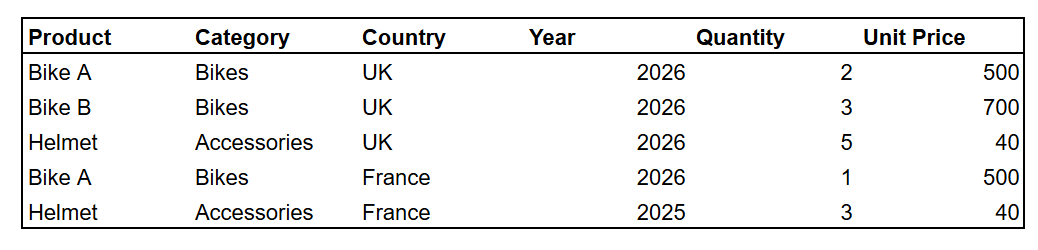
Let's use this Sales table throughout the example
Row context
Row context means DAX is evaluating a specific row in a table.
For example,
Sales Amount = Sales[Quantity] * Sales[Unit Price]
DAX evaluates the expression one row at a time.
For the first row, it calculates: 2 x 500 = 1000
For the secoun row: 3 x 700 = 2100
DAX knows which Quantity and Unit Price to use because it is currently evaluating that particular row.
A simple way to think about row context is
Which row am I on now?
Row context in iterator functions
Row context also appears in iterator functions such as SUMX.
Total Sales = SUMX( Sales, Sales[Quantity] * Sales[Unit Price])
SUMX goes through the table row by row. For each row, it calculates the expression first (Sales[Quantity] * Sales[Unit Price]), then adds all the results together.
Filter context
Filter context controls which rows are available to a calculation.
For example,
Total Quantity = SUM(Sales[Quantity])
In Power BI matrix, Category by Year looks like this
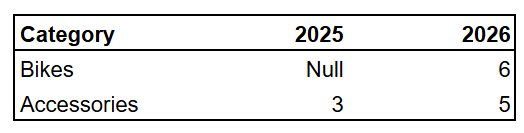
When Power BI calculates the value for Bikes in 2026, the measure is evaluated with those two filters
- Year = 2026
- Category = Bikes
This means DAX includes only the sales row that meets both conditions,
The rows that match those conditions from the Sales table are

So Total Quantity = 6
If the user also selects UK in Country, the filter context becomes
- Year = 2026
- Category = Bikes
- Country = UK

So Total Quantity = 5
The caluclation itself hasn't changed, what changed is the set of filters applied when DAX evaluates the measure.
Filter context can come from
- Rows and columns in a visual
- Slicers
- Page and report filters
- Relationships
- DAX functions such as CALCULATE
A simple way to think about filter context is
Which rows are available to my calculation after all the filters are applied?
Summary
Contex is important because DAX does not jsut evaluate a formula, it also considers the environment in which that formula is being evaluated
When working with DAX, two useful questions to ask are
What rows are currently available to the calculation? → Filter context
Is DAX currently working on a particular row? → Row context
Once the difference between these two becomes clear, another important DAX concept becomes easier to understand.