


Welcome back to my ongoing series about my passion project, building a dashboard using all of the dialogue from Star Trek: The Next Generation! When we left off, I was almost done with processing the original dataset I scraped, transforming it so that one row represented a single line of dialogue. For the kind of analysis I wanted on the dashboard, I needed things at the individual word level. This would let me answer questions like "who says the most words in season 2", "what species gets mentioned the most", and "which character spoke the most in this episode" without losing information to the fact that lines of dialogue can differ in their lengths.
In order to know who is doing the speaking, I first had to isolate the speaker names from their corresponding dialogue. Fortunately, my prior steps set this up to be pretty straightforward, with every row including an all-caps name, a space, then a line of dialogue.
To separate the name and line, I had to translate that into regular expression terms: (\w+)[\s.]+(.*). Regular expressions are pretty much illegible at a glance, so I will take the time to break this one down! For this use case, I used the "Parse" output method in the Alteryx RegEx tool, which requires parentheses around each capture group, or subsection of the string that I want to be returned as its own column.
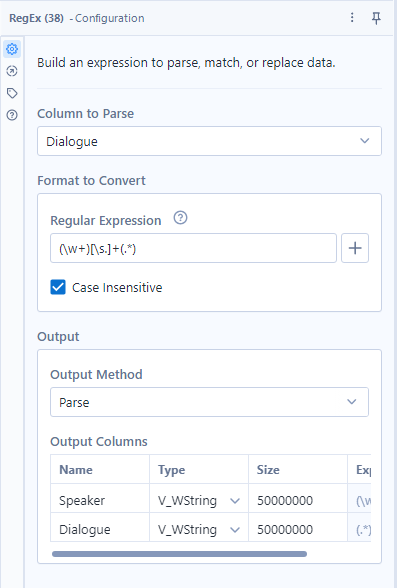
The (\w+) means that I want to capture 1 or more \w characters, \w being the code for anything alphanumeric. I could have specified these to be capital, but since I could be sure they were all capitalized, this encoding sufficed to pick up all of the character names.
In Alteryx RegEx, square brackets indicate options for a character to be filled in, so this [\s.]+ means that we could take 1 or more consecutive instances of either a space or any character. This primarily is meant to remove the space between the name and the line, but also has an adjustment just in case that intermediate character is every anything besides a space.
Last, (.*) means "any amount of any character", which is my typical RegEx go-to for capturing everything. This may not always be what you want, so its use requires care, but since my desired capture group was the entire rest of the string, it was the right RegEx to use here.
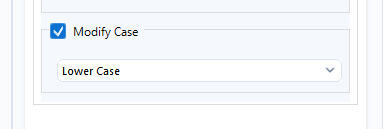
Separating the dialogue from the speaker name was necessary, but the full lines of dialogue now need to be split into their individual words. I did this using the "Text to Rows" configuration of the "Text to Columns" tool, setting the delimiter as the space character " " so that each space was removed and forced the creation of a new row of data. At this point I also forced every string to be lower case so that words would be counted the same regardless of their capitalization, which can vary randomly based on their placement within sentences and phrases of dialogue. This used the data cleanse pro tool!
After filtering out the empty rows that the "Text to Rows" produced as a result of consecutive spaces, we finally have the desired dataset! About 800,000 words of dialogue spanning 178 episodes, or ~150 hours of content (approximately 50 words per minute on average throughout the show).
In practice, a 3 field dataset like this (episode #, speaker, word spoken) requires supplemental data to build out a full dashboard. We still don't have easy access to the season structure, episode names, episode descriptions, or episode ratings, which are fundamental parts of the story of this data generation process. Before we can start building, we need to go on one last mission for the remaining pieces of information to use! See you next time!