


Today, I learned that one of Tableau's most interesting features has been hiding in plain sight, and I suspect that's precisely why it might be underutilized.
It's the Web Page Object!
At first glance, it doesn't seem particularly exciting. You drag it into your dashboard, give it a URL, and a webpage appears. Nothing revolutionary, right?
Well, not quite.
Things get considerably more interesting when you combine it with URL actions. Suddenly, your dashboard isn't just showing charts and numbers; it can connect what you're analyzing to information elsewhere on the internet. Imagine clicking on Afghanistan in a dashboard about economic development and having relevant information about the country appear right next to your visualization.
As someone who spends an unreasonable amount of time thinking about why some countries prosper while others struggle, I find that rather exciting. So, let's explore how this little object works, what we can do with it, and a few things you might have to negotiate with Tableau along the way.
Getting Started With the Web Page Object
If you're as excited as I was when I first learned about this feature, here's how you can put it to work in your own dashboard. First, you'll need to open Tableau, summon the stamina to create a few charts, and somehow make it all the way to building a dashboard. Once you you have survived that journey, things get surprisingly straightforward. Or at least, that's what Tableau would like you to believe.
Here are the steps:
- Open your dashboard in Tableau Desktop.
- Locate the Objects section on the left-hand side.
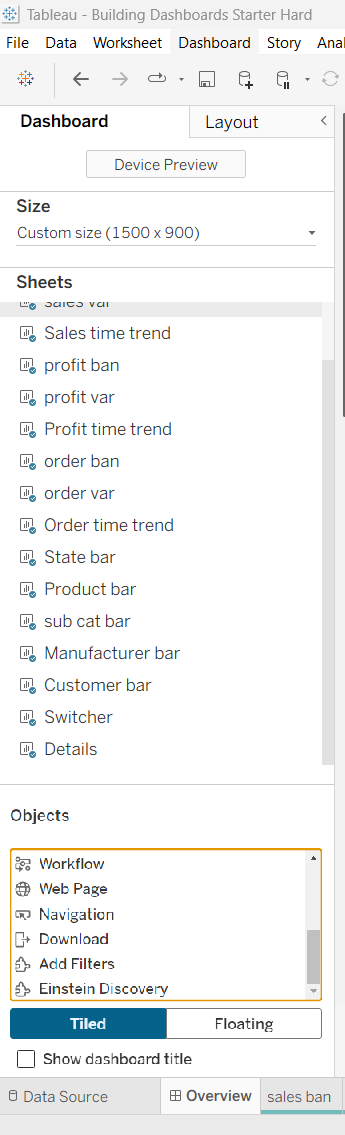
- Drag the web Page object onto your dashboard.
- Enter the URL of the webpage you want to display.

- Click Ok.
And there you have it! Your dashboard now has a window to the internet. Of course, this assumes the website you're trying to display actually wants to cooperate. Some websites restrict embedding, so don't immediately blame yourself if a webpage refuses to appear.
Want to take it a step further?
Now, if you really want to harness the power of this feature, combine it with a URL action.
But how exactly do you do that?
Well, I'm going to leave that part to my colleague Xica, who has written a blog explaining how URL actions work. Consider this a collaborative effort: I've introduced you to the Web Page object, and Xica will help you take it on its next adventure.
You can read her blog here:
And just like that, we have gone from a humble dashboard object to something that can make our visualizations a little more interactive, informative, and connected to the world beyond our datasets.
Not bad for something hiding in Tableau's Objects panel, is it?