


Regex, short for Regular Expressions, is a way of identifying patterns within text. Rather than searching for a specific word or number, Regex allows us to search for text based on its structure.
Why Do We Use Regex?
One of the main advantages of regex is that it allows us to work with text more efficiently.
Regex is commonly used for:
- Extracting data: Identifying specific information within a larger string, such as email addresses, phone numbers or reference codes.
- Cleaning data: Removing unwanted characters, spaces or unnecessary text.
- Validating data: Checking whether information follows a particular structure or format.
- Replacing text: Finding patterns within a string and replacing them with something else.
Regex can be used in tools such as Alteryx, Python and SQL, although the exact syntax and supported features may differ.
Using Regex in Alteryx
In Alteryx, regex can be used in two ways: through the RegEx tool or within the Formula tool, using functions such as REGEX_Match( )
The regex tool allows us to work with text in four different ways: Replace, Tokenize, Parse, and Match. Although each option uses regex patterns, they serve different purposes.
Replace: In regex, "replace" allows us to find a pattern within a string and replace it with something else. For example, we could remove unwanted characters from a field and replace it with a space.
Tokenize: This selection allows us to split a string into smaller pieces based on a regex pattern. For example, we could seperate a sentence into individual words, with each matching word becoming a seperate row or column.
Parse: Parsing allows us to extract specific parts of a string into seperate columns using capture groups, which are defined using ().
In comparison to tokenize, which identifies repeated matches, parse uses different capture groups within a single regex expression to extract specific pieces of information. For example, if a customer reference contains two letters followed by four numbers, we could use parse to extract the letters into one column and the numbers into another.
Match: Match checks whether an entire string matches a specific Regex pattern and returns a result indicating whether the match was successful. For example, we could use match to check whether customer reference numbers follow the expected format of two uppercase letters followed by four numbers.
Understanding Regex: Qualifiers and Quantifiers
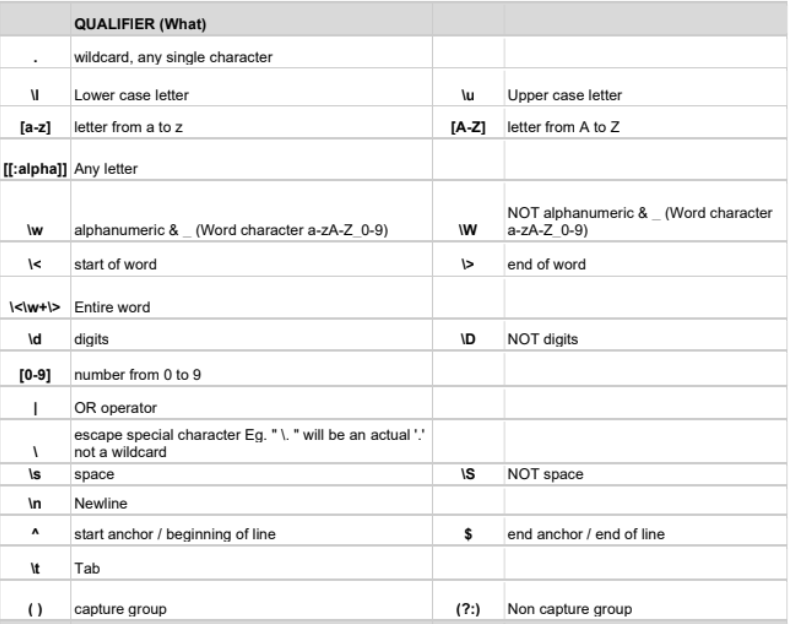
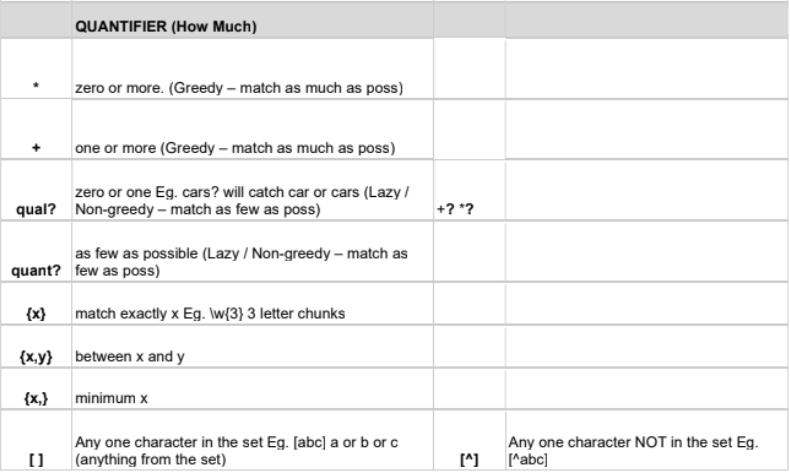
Before writing a regex expression, we need to understand two important components: qualifiers and quantifiers.
Qualifiers tell regex what to look for, while quantifiers tell regex how many times something should appear.
Putting Regex into Practice
To demonstrate how different Regex expressions work, I'll be using https://regex101.com/ to write my expressions.
The example I will be using is :
Name: Hayfa Hamid | ID: AB1234 | Email: hayfa.hamid@gmail.com | Order: ORD-583 | Date: 08/10/2026
Example 1: Finding Digits
We will start with:
\d+
If we break this down:
- \d matches any digit between 0 and 9
- + tells regex to match one or more consecutive digits
When applied to our string, Regex finds:
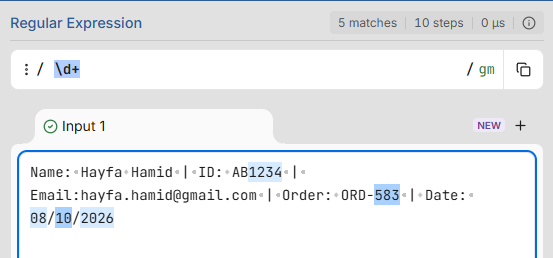
This is useful when we want to identify numerical values within text without knowing the exact numbers beforehand.
Example 2: Matching a Specific Format
We can make our expression more specific by combining different qualifiers and quantifiers.
Let's use:
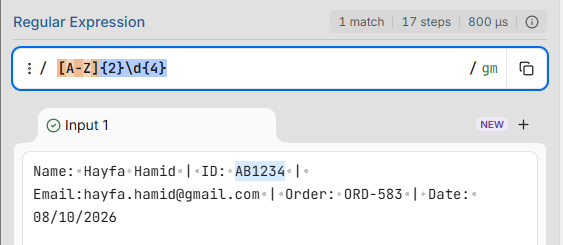
[A-Z]{2}\d{4}
This expression contains two parts:
- [A-Z]{2} matches exactly two consecutive uppercase letters.
- \d{4} matches exactly four consecutive digits.
Together, they identify:
Example 3: Using the OR operator
Regex also allows us to search for multiple alternatives using the | symbol, which acts as an OR operator.
For example:
Hayfa|Hamid
This will allow us to identify either Hayfa or Hamid within our string.
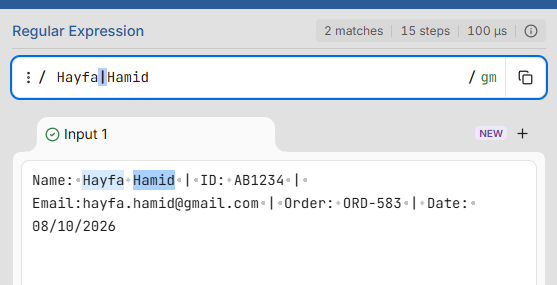
This is especially useful when looking for multiple possible values without writing separate expressions for each one.
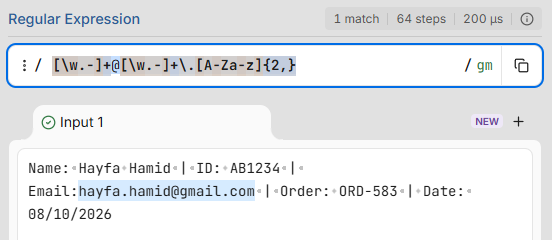
Example 4: Extracting an Email Address
We can now combine several expressions to identify something more complex.
Let's use:
[\w.-]+@[\w.-]+\.[A-Za-z]{2,}
If we break it down:
- [\w.-]+ matches one or more word characters, dots or hyphens.
- @ matches the @ symbol.
- [\w.-]+ matches the domain name.
- \. matches a literal full stop.
- [A-Za-z]{2,} matches two or more consecutive letters
Wrap up
Regex can seem intimidating at first, particularly when expressions start getting longer. However the underlying logic remains relatively simple. Once you understand what you're looking for and how many times it should appear, you can start building patterns to identify increasingly complex information.
If you're new to Regex, I'd recommend experimenting with https://regex101.com/ and keeping a Regex cheat sheet nearby. It's much easier to understand the expressions when you can see exactly what they're matching.
Good Luck !