


In this blog we will discuss how you can connect to an API via Python and some of the reasons for doing so. API's (Application Programming Interface) are effectively connections between softwares, allowing them to communicate with each other.
REST API
There are many types of API's but the most common is the REST (Representational State Transfer) API. REST has a of set of functions which allows a client to interact with a server by exchanging data. Usually the client will request data from the server, and the server will respond - the communication is normally enabled through HTTP. The softwares available for calling an API are varied and the way in which you do so is set out in the documentation of the specific API. It is likely you will come across poorly documented API's at some point which will make connecting more of a challenge.
Using Python
For the purposes of this blog I will showcase some example Python code which was used to connect to a specific API (remember for other API's the documentation may have specific requirements). Figure 1 gives a brief overview of the Python pipeline used.
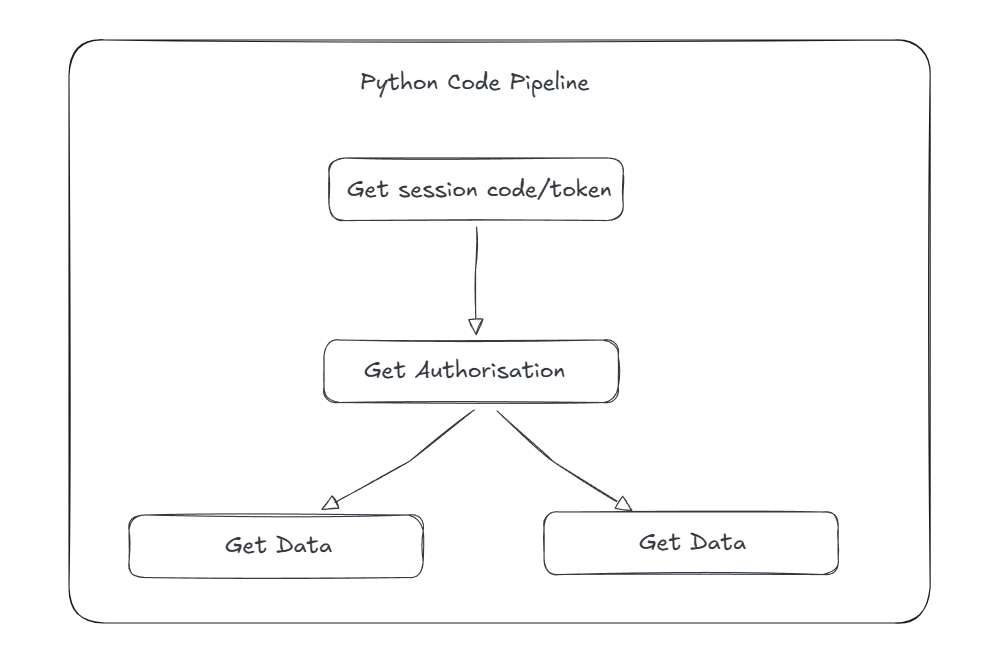
Each step of the pipeline represents a function within the Python script to help with readability (but you can obviously rewrite code to your preference). It is very common (this example is no exception) that the output from an API call will require some sort of transformation for further analysis. With this being the case I recommend the following Python packages:
1) Pandas: contains functions for data transformation and outputting
2) Requests: allows you to send HTTP requests using Python
3) Datetime: used for manipulating dates/times (and getting the current date/time etc.)
We will now discuss the first two functions from the Python pipeline (the others functions follow very similar Python codes).
Getting a session token:
This particular API required a session token to be acquired prior to being authenticated. The user needed to provide the correct URL as outlined in the documentation and specify the payload (the data being transferred) and the headers (extra sources of info for each API call).
app_name = input("Enter app_name (use ''): ")


def Get_Session_ID():
    '''Obtains a session token/session ID'''
    url = ""
    clientTime = datetime.now().strftime("%Y-%m-%dT%H:%M")

    payload = {
        "appName": app_name,
        "currentDateOnClient": clientTime }

    headers = {
        "X-APP-ID": ""}

    response = requests.post(url, headers=headers, json=payload)

    if response.status_code == 200:
        # The session token is returned in the custom header 'session-header'
        session_token = response.headers.get("session-header")
        print(f"Successfully retrieved Session ID: {session_token}")
        return session_token
    else:
        print(f"Failed to get session ID: {response.text}")
        return None
If the response code is anything other than 200 then the response failed and an error message will be read. The output of the call is simply a string of numbers and letters.
Getting Authenticated:
Once the session token had been successfully received it was possible to be authenticated. This required the users password and username.
username = ""
password = ""
app_name = input("Enter app_name (use ''): ")


   def Authentification_V2(session_token, app_name):
    '''obtains session authentication, requires the session code'''
    url = ""


        clientTime = datetime.now().strftime("%Y-%m-%dT%H:%M")
        payload = {
        "username": username,
        "password": password,
        "loginProperties": {
            "appName": app_name,
            "clientTime": clientTime}
                                      }
        headers = {
          'session-header': session_token,
          'Cookie': session_token,
          'X-APP-ID': '' #application identifier
        }

        response = requests.request("POST", url, headers=headers, json=payload)
        data = response.json()
        data = pd.json_normalize(data) #flatten to table


        '''iterator to 'explode' all nested JSON files into dataframes'''
        convert_columns_to_list = data.columns.tolist()
        for column in convert_columns_to_list:

            if data[column].isna().all(): #ignore exploded columns
                continue

            first_valid_column = data[column].dropna().iloc[0] #find first valid non-null value from column then iterate by position


            #is the first valid column a list?
            if isinstance(first_valid_column, list):
                data = data.explode(column, ignore_index=True)

                #If exploded lists are dictionaries then flatten them into new columns
                if len(data[column].dropna()) > 0:
                    sample = data[column].dropna().iloc[0]
                    if isinstance(sample, dict): #check to see whether row contains a dictionary after exploding
                        expanded = pd.json_normalize(data[column]) #explode dictionary
                        expanded.columns = [f"{column}.{subcol}" for subcol in expanded.columns]
                        data = pd.concat([data.drop(columns=[column]), expanded],axis=1) #concatenate exploded dictionary back into data table


            #is the first valid column a dictionary?
            elif isinstance(first_valid_column, dict):
                expanded = pd.json_normalize(data[column])
                expanded.columns = [f"{column}.{subcol}" for subcol in expanded.columns]
                data = pd.concat([data.drop(columns=[column]), expanded],axis=1)


        output_path = ""

        data.to_excel(output_path, index=False)

        #print("--- Authentication Response ---")
        #print(data)

        print(f"\nExcel file saved to: {output_path}")


Authentification_V2(session_token, app_name)
The code above may look complex but the underlying principles are fairly simple. Using the session token/ID from the previous function, username and password, the function authenticates the user. The resulting output in this case was a nested JSON file which needed to be expanded and transformed into a data-frame. The bulk of the code is related to this final process but this will be entirely API dependent - you may not get nested JSON files as an output in other situations.
A brief note on HTTP Methods
You may have come across so called HTTP methods such as GET and POST.
GET: used to request data from a source/server
POST: used to send data to a server to update or create a request
Other methods exist but will not be discussed here.
Why Python?
There are several reasons why Python might be a viable option for API calls:
1) Versatility: Python enables you to have maximum control over your code and API calls
2) Packages: Additional Python packages such as Pandas enable the efficient transformation of API outputs within the same script ensuring everything is done in one place
3) Syntax Readability: Dependent on how the code is written, it can be easy to follow along with what the code is doing (obviously some level of Python proficiency is required)
And there you have it, a blog on using Python to connect to an API. Obviously any code will have to be tweaked in accordance with the specific API documentation you use but the underlying principles should remain.