


What are materializations in dbt?
Materializations describe how your models appear in your warehouse. In other words, they are the build strategies for your data. In terms of dbt, these define which DDL (Data Definition Language) statements statements should be wrapped around the select statements for your models.
There are 5 types of materializations that dbt supports:
- Views
- Tables
- Ephemeral Models
- Incremental models
- Materialized views
However, the most common ones are views, tables, and ephemeral models, so this blog will focus on these, as well as how to configure them.
For more on incremental models and materialized views, see these resources:
Views
- These are where the SQL query for your model is stored in your data warehouse.
- They take up very little storage, as the data itself isn't actually being stored
- You will always get the latest data available in the underlying sources when you query the view.
- If you have complex SQL statements for your views, querying them may take a long time, as it has to find and calculate the logic for the data every time you query it
For example, let's say you have source data raw_animals from an animal shelter, which contains information on the animal's name, type, and estimated age:
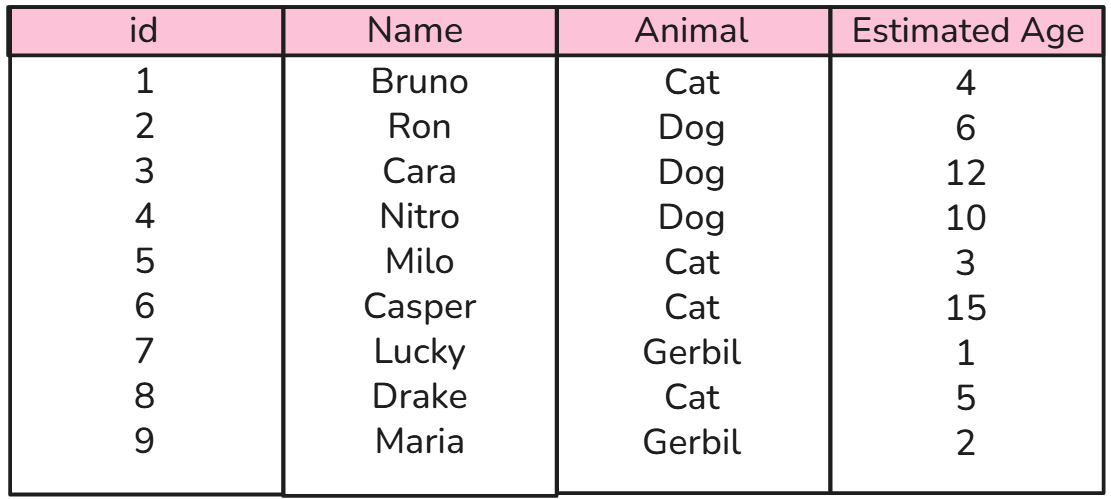
Let's say you had a model cats.sql, which filtered to only the cats:
with source as (
      select * from {{ source('animal_shelter', 'raw_animals') }}
)

SELECT
        Id,
        Name,
        Animal,
        Estimated_age as age_at_rescue,
FROM source
WHERE Animal = 'Cat'
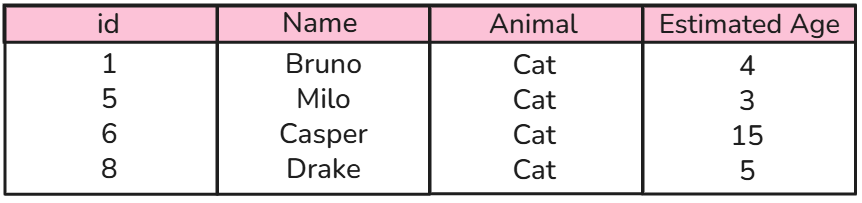
As the data itself isn't stored in your data warehouse, you would have to query the view to see any results.
So, by running
SELECT *
FROM Cats
, you could then see the following:
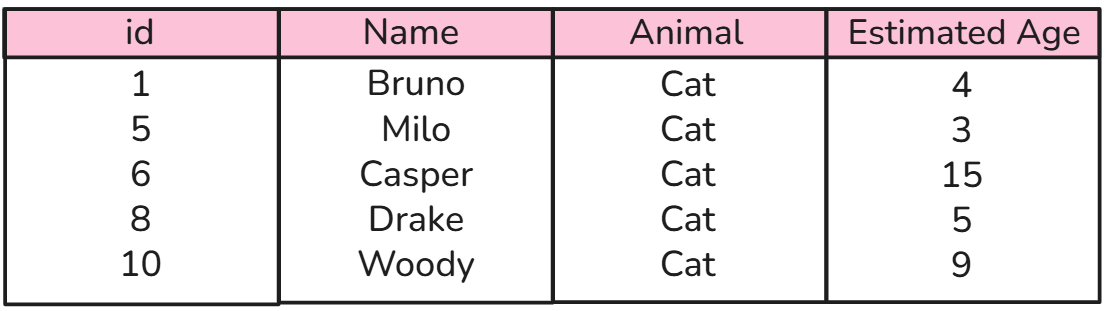
However, let's say a new cat entered the animal shelter. If you then ran
SELECT * FROM Cats again, the results would reflect the new arrival once it has been updated in the source:
Tables
- This is where the data itself is being stored, row by row, in your data warehouse
- Tables require more storage in your data warehouse
- These are slower to build than views, but once they are built they are fast to query, as the data is already there
- However, when you query from a table, the data may not necessarily be up-to-date
Example:
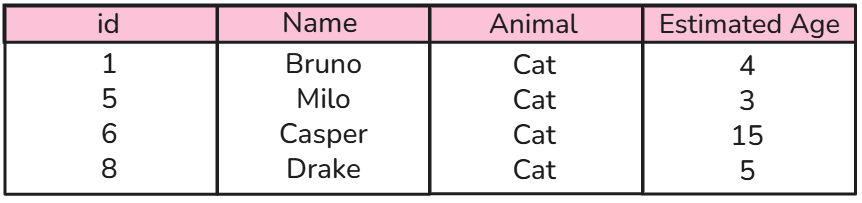
Let's say you wish to materialize your model cats.sql as a table instead of a view. Unlike a view, where the warehouse stores the SQL query, a table stores the actual results of that query. When you query the table, you are retrieving the data that dbt last built and stored in your warehouse:
With this, if cat #10 joined the animal shelter, this table would not change unless it was replaced.
Ephemeral Models
- These are a unique type of materialization, that don't exist in your database
- These are essentially 'snippets of SQL code that can be reused in downstream models
- These code snippets will be imported as CTEs for your downstream models
- These are best suited for lightweight, reusable transformations that you want to reference in multiple downstream models, but don't need to query independently.
Example:
Looking back at our animal shelter example, let's say you wanted to categorise the age categories of all the animals in your shelter, creating a model called animal_age_categories.sql
{{
    config(
            materialized='ephemeral'
           )
}}

WITH source AS (
    SELECT *
    FROM {{ source('animal_shelter', 'raw_animals') }}
)

SELECT
    Id,
    Name,
    Animal,
    Estimated_age,
    CASE
        WHEN Estimated_age < 1 THEN 'Young'
        WHEN Estimated_age BETWEEN 1 AND 7 THEN 'Adult'
        ELSE 'Senior'
    END AS age_category
FROM source
With this configured as an ephemeral model (see the config block at the top), running this would not create anything in your data warehouse. Instead, dbt would simply store the SQL logic to reuse in other models.
Now, let's say you wanted to create a downstream model, which only contains young animals in the shelter, young_animals.sql :
WITH animal_details AS (
    SELECT * FROM {{ ref('animal_age_categories') }}
)

SELECT *
FROM animal_details
WHERE age_category = 'Young'
When dbt builds these downstream models, it will insert the SQL from animal_age_categories.sql directly into each model as a CTE.
This means:
animal_age_categorieswill never exist as a separate table or view in your warehouse.- Multiple downstream models can reuse the same SQL logic.
- You avoid having to duplicate the age categorisation logic across multiple models.
Think of ephemeral models as reusable building blocks: they allow you to write a piece of SQL once and reuse it in multiple models, without creating a separate object in your data warehouse.
How to configure materializations in dbt
- dbt_project.yml - by default, all models are materialized as views
- In your dbt project yml, you can configure projects at the folder level
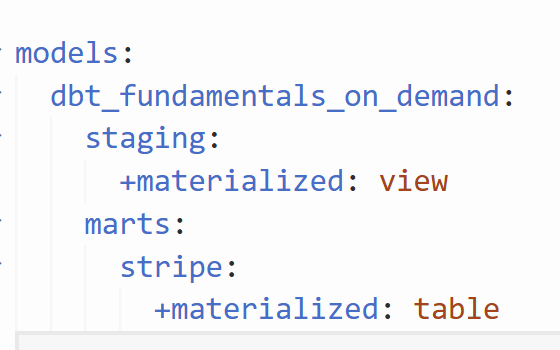
In this example here, all models in the staging folder will materialize as a view (though this is by default, so this configuration may not be necessary).
Also, all models in the stripe folder within the marts folder will materialize as a table.
- Properties.yml file - these are the .yml files that you use for your models to configure your tests and documentation. An example of this configuration in a properties file is as follows:
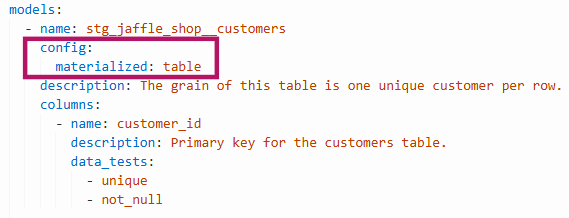
Here the configuration details are in the red box. Here the model stg_jaffle_shop__customers is configured as a table.
Note: When the same model has different materialization configurations, the more specific configuration takes precedence. For example, an individual model's configuration in a properties .yml file will override its folder-level configuration in dbt_project.yml.
- Model.sql file - You can also configure the materialization within the model's SQL file themselves. To do this, you can use a config block at the start of your file, like so:
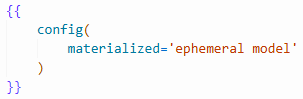
Configurations within the model's file itself will override any set at the properties.yml level and at the dbt_project.yml level.
Summary
| Feature | Views | Tables | Ephemeral Models |
|---|---|---|---|
| Stores data? | No | Yes | No |
| Exists in warehouse? | Yes | Yes | No |
| Query performance | Depends on query complexity | Generally faster | Depends on downstream query |
| Reflects latest source data? | Yes, when queried | Only after rebuilding | When downstream model is built |
| Can be queried independently? | Yes | Yes | No |