


Coding in SQL can quickly get overwhelming when dealing with complex queries. CTEs (Common Table Expressions) allow you to simplify these harder queries by breaking them down into smaller, digestible sections.
What is a CTE?
Definition - a temporary result set that a SELECT, INSERT, UPDATE, or DELETE query can use. CTEs enable you to construct a named, reusable subquery inside your SQL statement and are defined using the WITH keyword.
In simple terms: a temporary table you create inside a SQL query to make your code easier to read and reuse, you can then reference it later down the line.
Syntax:
A CTE must be started by a WITH clause, followed by the table name and then an AS. Below is a simple example:
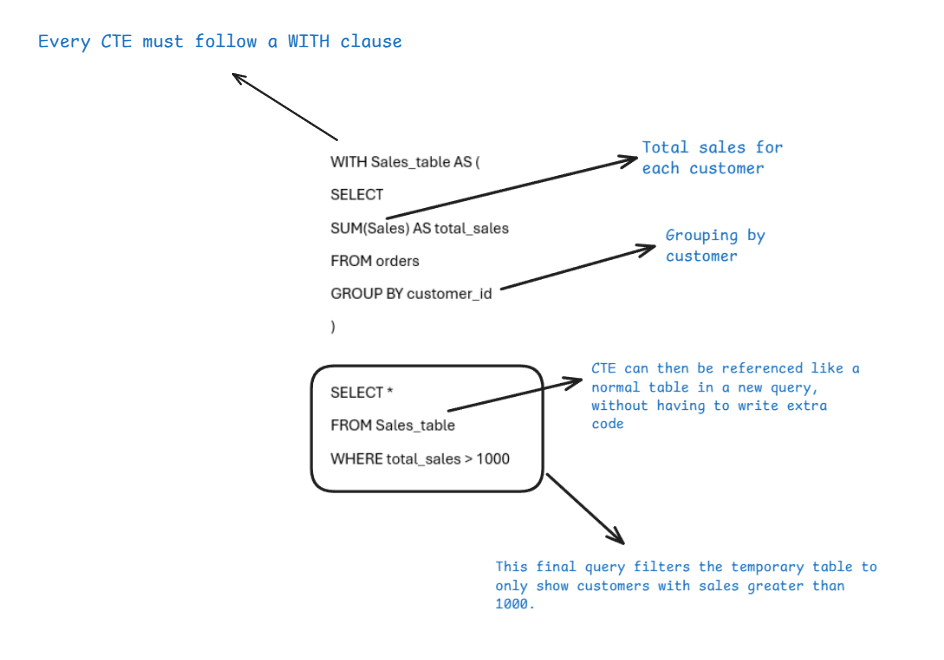
Breaking the syntax down step-by-step:
- WITH informs SQL that you are about to write a CTE.
- Sales_table is the name we give to the CTE to refer back to later on. Make sure you choose a name that is easy to remember.
- AS clause will then link the CTE to the name Sales_table.
- Query inside the brackets is what generates the temporary output.
Why are CTEs Useful?
CTEs break your SQL logic into separate steps, making your code much easier to follow and go back to.
Especially useful when:
- Re-using calculations multiple times.
- Debugging your query.
- Working with complicated queries.
- Wanting to build your logic in a more intuitive way.
CTE vs Sub-query
The alternative to a CTE is writing a nested subquery, which would look like this:
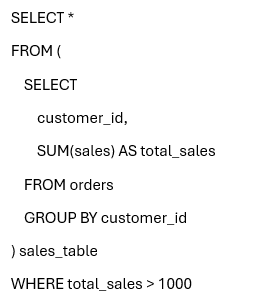
The whole subquery is nested inside the FROM clause. This works for a small example like this, but imagine how difficult to read this could become when using multiple nested queries. You also end up rewriting full query blocks rather than simply referencing a named result set, as you would with a CTE. CTEs help resolve this by breaking logic into clear, structured steps and significantly improve readability.
Final Notes
A CTE's main objective is to improve structure and clean your queries. However, they are temporary, only existing in the query and not stored within the database. It is essential to give them memorable and clear names too. They are an extremely handy tool once you wrap your head around the syntax.