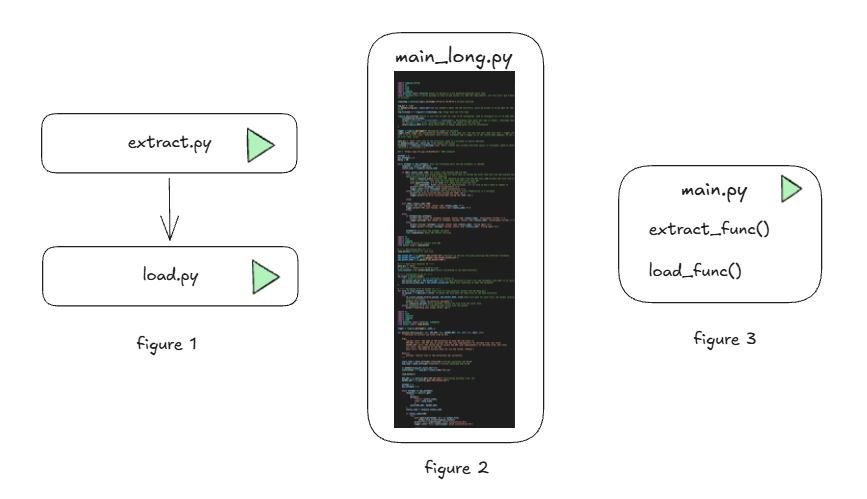
Instead of having lots of code in one script, it is standard practice to modularize your code. Instead of having everything in one massive script (figure 2), or having to schedule multiple scripts to run (figure 1) you create functions to call in one main script (figure 3). Using functions instead of merging into one massive script makes the code easier to understand and recognise find the location of any errors.
What is a function?
A function is a block of code that is built for a specific purpose. It allows for parameters to make the code reusable and helps to streamline code avoiding repetition.
To create a function the syntax is the following:
def function_name(parameter1: type, parameter2: type, etc: str):
    """_summary_

    Args:
        parameter1 (type): _description_
        parameter2 (type): _description_
    """
    <code>
The summary should be a description of the function that would help the user understand what it does. The ‘Args’ are descriptions of each parameter that is required for the function. These appear when hovering over the text of the function and will help the user know what sort of variables are expected.
It is best practice to have one python file for a function and to save these into their own directory.
How do I know what parameters are needed?
The parameters you add to the function should be values that are subject to change or might need to be reused somewhere else outside of the specific function (and therefore should be declared in the main code).
Example
For example, when extracting data from an API and uploading to a data warehouse there are at a minimum a couple steps: the extraction, and the loading. In this example we have two separate python files, one for extracting and one for loading.
#Extract.py - code extracting data from API and saving data locally>

import os
import json
import requests

data_dir = 'data'
    timestamp = datetime.now().strftime('%Y-%m-%d %H-%M-%S') #create datetime
    os.makedirs(data_dir, exist_ok= True)

    filename = f'{data_dir}/{name}.json'
    url = 'https://api.endpoint'
    response = requests.get(url)
    status_code = response.status_code

    if 200<= status_code <300:
        data = response.json()
        with open(filename,'w') as file:
            json.dump(data, file)
            print(f'File {filename} saved successfully!')
    else:
print(f'API call failed, status code {status_code}')#Load.py
#code uploading data to data warehouse and deleting files locally
Creating the function
Start by creating the folder for the functions, I’ve called this ‘Modules’. Then create a new python file in the folder for the function i.e., ‘extract_function’.
I start off with my function file (extract_function.py) side by side with the original file (extract.py) and copying in the required libraries and naming the function.
import os
import json
import requests

def function_name():
I then copy in all the code required to extract the data from the API.
import os
import json
import requests

def function_name():
    data_dir = 'data'
    timestamp = datetime.now().strftime('%Y-%m-%d %H-%M-%S') #create datetime
    os.makedirs(data_dir, exist_ok= True)

    filename = f'{data_dir}/{name}.json'
    url = 'https://api.endpoint'
    response = requests.get(url)
    status_code = response.status_code

    if 200<= status_code <300:
        data = response.json()
        with open(filename,'w') as file:
            json.dump(data, file)
            print(f'File {filename} saved successfully!')
    else:
        print(f'API call failed, status code {status_code}')
I then go through the code and see if there are any variables that I might change or will be repeated elsewhere in the code.
Once I note a variable I want to parameterise, I remove the definition from the function code and add the variable to the function definition.
import os
import json
import requests

def function_name(data_dir: str, timestamp: str, url: str):
    data_dir = 'data'
    timestamp = datetime.now().strftime('%Y-%m-%d %H-%M-%S') #create datetime
    os.makedirs(data_dir, exist_ok= True)

    filename = f'{data_dir}/{name}.json'
    url = 'https://api.endpoint'
    response = requests.get(url)
    status_code = response.status_code

    if 200<= status_code <300:
        data = response.json()
        with open(filename,'w') as file:
            json.dump(data, file)
            print(f'File {filename} saved successfully!')
    else:
        print(f'API call failed, status code {status_code}')
I repeat this process until I get to the end of my code.
We then might want an output from this function. This might be used to determine whether the execution was successful and to run the next function or not.
If the extraction is successful I want it to be true. Therefore I add ‘return true’ when the data has been saved.
import os
import json
import requests

def function_name(data_dir: str, timestamp: str, url: str):
    data_dir = 'data'
    timestamp = datetime.now().strftime('%Y-%m-%d %H-%M-%S') #create datetime
    os.makedirs(data_dir, exist_ok= True)

    filename = f'{data_dir}/{timestamp}.json'
    url = 'https://api.endpoint'
    response = requests.get(url)
    status_code = response.status_code

    if 200<= status_code <300:
        data = response.json()
        with open(filename,'w') as file:
            json.dump(data, file)
            print(f'File {filename} saved successfully!')
		return True
    else:
        print(f'API call failed, status code {status_code}')
        return False
To finish off the function, I then add the descriptors for function. Python will create a template for you if type three speech marks and ‘Generate Docstring’.

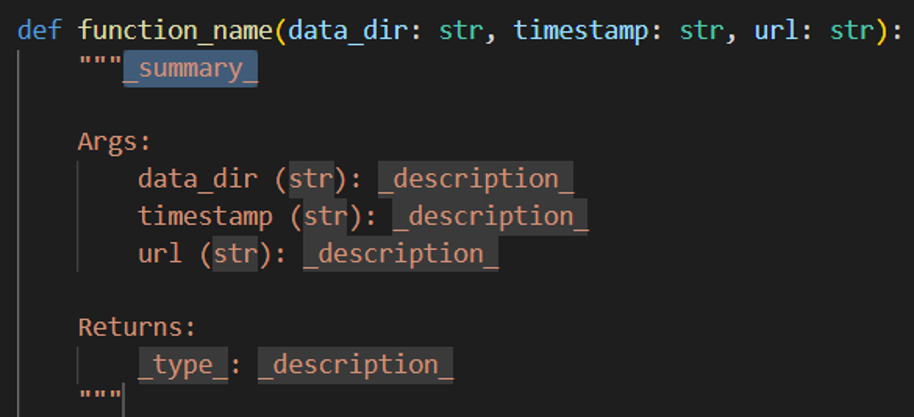
Writeup the description for the variables, output and what the function does. Your final script for the function may look something like this:
import os
import json
import requests

def function_name(data_dir: str, timestamp: str, url: str):
    """Function to extract JSON files from a URL and save to a destination

    Args:
        data_dir (str): filepath to save data to
        name (str): name of the data file
        url (str): URL to pull data from

    Returns:
        _type_: _description_
    """
    os.makedirs(data_dir, exist_ok= True)

    filename = f'{data_dir}/{name}.json'
    response = requests.get(url)
    status_code = response.status_code

    if 200<= status_code <300:
        data = response.json()
        with open(filename,'w') as file:
            json.dump(data, file)
            print(f'File {filename} saved successfully!')
            return True
    else:
        print(f'API call failed, status code {status_code}')
	  return False
Adding to main.py
I then create the main.py file which will be the singular file run to execute all the code and import the function from the ‘modules’ directory. I then define the variables needed for the function before calling the function.
from modules.extract_function import extract_func
from datetime import datetime

data_dir = 'data'
timestamp = datetime.now().strftime('%Y-%m-%d %H-%M-%S')
url = 'https://api.endpoint'

extract_result = extract_func(data_dir, timestamp, url)

print(extract_result)
The extract result will print the Boolean output – whether the files were extracted successfully or not. This is useful for when (after you have created the load function) you can stop the script from executing the load function if the extract was unsuccessful.
This could look like the following:
from modules.extract_function import extract_func
from datetime import datetime

data_dir = 'data'
timestamp = datetime.now().strftime('%Y-%m-%d %H-%M-%S')
url = 'https://api.endpoint'

extract_result = extract_func(data_dir, timestamp, url)

if extract_result: #if the result is true
    load_func()
else:
    print('No files extracted. Load aborted.')
Cleanup
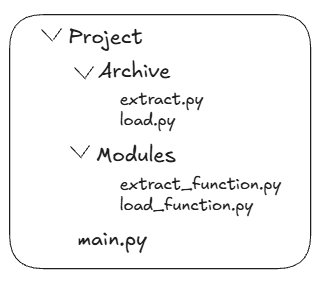
You have now modularised your code! To cleanup the files, add the original python scripts to an archive folder for reference. The final folder structure should look like the following: