


For a recent dbt migration project for a client, I built a macro that generated SQL for models based on a seed configuration table. While this approach saved time, I wanted to take my workflow a step further by automating not just the SQL generation itself, but also the creation of the .sql files. Here’s how I was able to achieve this.
My Original Process
I started by creating a macro to parse through a configuration table and generate SQL.
{% macro generate_int_model_refactored(
    upstream_model,
    where_filter=None,
    case_condition=None,
    leading_commas=False,
    case_sensitive_cols=False,
    materialized=None
) %}

{%- set upstream_relation = ref(upstream_model) -%}
{%- set columns = adapter.get_columns_in_relation(upstream_relation) -%}
{% set column_names = columns | map(attribute='name') %}

{%- if materialized is not none -%}
{{ config(materialized=materialized) }}
{%- endif -%}

{% set cte %}
with upstream as (
    select * from {{ upstream_relation }}
)

select
    {%- if leading_commas %}
    {%- for column in column_names %}
    {{ ", " if not loop.first }}{% if not case_sensitive_cols %}{{ column | lower }}{% else %}{{ adapter.quote(column) }}{% endif %}
    {%- endfor %}
    {%- else %}
    {%- for column in column_names %}
    {% if not case_sensitive_cols %}{{ column | lower }}{% else %}{{ adapter.quote(column) }}{% endif %}{{ "," if not loop.last }}
    {%- endfor %}
    {%- endif %}
    {# generating case conditions #}
    {% if case_condition %}
        , {{ caseCondition_constructor(case_condition) }}
    {% endif %}
from upstream

{# generating where statements #}
{%- if where_filter %}
where {{ whereFilter_constructor(where_filter) }}
{%- endif %}

{% endset %}

{# return SQL definition #}
{% do return(cte) %}

{% endmacro %}
To create a new model, I had to complete the below steps (the screenshots below are not from my client work - I re-built parts of it locally using sample Zillow real estate data).
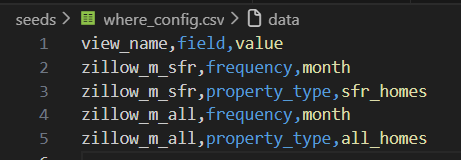
1. Add a new entry in the configuration table
The configuration .csv file resides in my seed directory and defines the 'where' conditions for each model. In the case of view 'zillow_m_sfr', I needed to apply two where filters: 1) frequency = 'month' 2) property_type = 'sfr_months'.
2. Create a new SQL file under my models directory
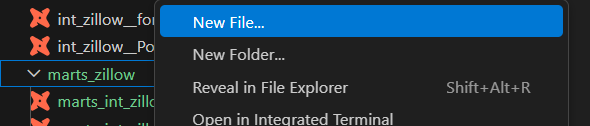
Next, I created a new .sql file under the models directory.
3. Execute the macro in that file
Finally, I called the macro within the newly created .sql file, passed in the relevant parameters from the seeded configuration table, and ran the model:
{{generate_int_model(upstream_model = 'int_zillow__PoP_metrics', where_filter='zillow_m_all', leading_commas=True)}}
While this workflow is already significantly more efficient than how I would have approached it without dbt, I wanted to optimize it further by automating Steps 2 and 3. This would eliminate the need to manually create a new model file and explicitly invoke the macro each time.
The Plan
There is already a wide range of dbt macros available in packages such as dbt_utils and dbt_codegen. In fact, I originally built my generate_int_model macro by refactoring an existing macro from dbt_codegen.
Before writing anything from scratch, I explored the dbt_codegen package to see whether a macro already existed that could accomplish what I needed. The base_model_creation pattern stood out to me.
#!/bin/bash
echo "" > models/stg_$1__$2.sql
dbt --quiet run-operation codegen.generate_base_model --args '{"source_name": "'$1'", "table_name": "'$2'"}' | tail -n +3 >> models/stg_$1__$2.sql
This macro leverages codegen.generate_base_model and writes the compiled output directly into a SQL file via a small Bash script.
Once again, dbt_codegen provided a strong foundation to build upon. I only needed to extend the pattern in two ways:
- Add a Python script to iterate through the configuration table and generate a SQL file for each model automatically.
- Replace
generate_base_modelwith my own custom macro (generate_int_model) to apply my project-specific logic.
By doing this, I could fully automate model creation by dynamically generating SQL files based on configuration metadata while preserving the flexibility of my custom macro.
Solution
I first needed to slightly refactor my macro. Originally, the macro simply returned the compiled SQL from Jinja - similar to how a Python function returns a value. To integrate with my Bash/Python workflow, I also needed the macro to print the Jinja output so it could be captured and written into files. I achieved this by adding a simple print statement at the end of the macro:
{{ print(cte) }}
Next, I built a Python script to iterate through my configuration file and pass each entry into the macro. Finally, I wrapped the macro execution in a command that writes the SQL into new .sql files. By combining a dbt seed configuration table, a custom dbt macro, and some Python/Bash scripting, I was able to fully automate the creation of models and their corresponding SQL files.
Here’s the Python script I used:
#!/usr/bin/env python3
import subprocess
import pandas as pd
import os
import json

# Read the configuration table
config = pd.read_csv('./seeds/where_config.csv')

# Loop through each view_name to generate SQL files
for view_name, df_group in config.groupby('view_name'):
    upstream_model = "int_zillow__PoP_metrics"
    where_filter = view_name

    # Define the target file for the generated SQL
    filename = f"models/marts_zillow/marts_{upstream_model}__{where_filter}.sql"
    print(f"Generating model for view: {view_name}")

    # Ensure the target directory exists
    os.makedirs('models/marts_zillow', exist_ok=True)

    # Build macro arguments as JSON
    args_dict = {
        "upstream_model": upstream_model,
        "where_filter": where_filter
    }
    args_json = json.dumps(args_dict)

    # Run the refactored macro
    cmd = [
        'dbt', '--quiet', 'run-operation', 'generate_int_model_refactored',
        '--args', args_json
    ]
    print(f"Running command: {' '.join(cmd)}")

    result = subprocess.run(cmd, capture_output=True, text=True, shell=True)
    if result.returncode != 0:
        print(f"Error running dbt for {view_name}")
        continue

    # Write the macro output to the SQL file
    output_lines = result.stdout.split('\n')
    with open(filename, 'w', encoding='utf-8') as f:
        f.write('\n'.join(output_lines))

    print(f"Created SQL file: {filename}")

print("Generated SQL files for all models")
This setup fully automates model creation. For each entry in the configuration table, the macro is executed and a corresponding .sql file is generated, which eliminates the need for any manual file creation or macro invocation.
Conclusion
Although the sample script and scenario I presented here are relatively straightforward, this method can be extended with more complex layers to programmatically interact with dbt in many ways - from generating .sql files for models to even creating .yml configuration files automatically.
An important caveat is that this solution only works in dbt Core. If you are using dbt’s cloud-based IDE, you cannot run external scripts like Bash or local Python scripts. By developing in both a local IDE (I used VS Code) and the cloud IDE, you unlock greater flexibility for programmatic, configuration-driven model creation and automation.