


If you’re looking for a fun, gamified way to sharpen your SQL skills, look no further than the SQL Murder Mystery by KnightLab. It turns data analysis into genuine detective work, and I can’t recommend it enough. In this post, I’ll be walking through my personal solution to the case. Consider this your final spoiler warning: I highly recommend trying to crack the case yourself before reading any further!
For this walkthrough I will explain any and all syntax as and when I use it.
You'll learn:
SELECT | FROM | WHERE | JOIN | LIKE | WITH
To start of with I used Visual Studio Code with the SQLite extension which allows for running queries and viewing the tables in one place. I downloaded the folder from: https://github.com/nuknightlab/sql-mysteries.
To start with some basic syntax:
SELECT determines what fields we want outputted so when you type this out think about what you want to be shown.
FROM determines which table we're looking at.
WHERE allows us to filter our table importantly this happens before our SELECT.
The first query, which is given to you on the website, selects the table names from sqlite_master. The table sqlite_master is created automatically in SQLite and contains all the information about our database. So by filtering to type = "table" and selecting name we are just returning the names for all our different tables.
The next step is interrogating the crime_scene_report_table. Before we begin, all the information we are given is that the crime was a murder, it happened on 01/15/2018 and it took place in SQL City. Prior to running any of these queries shown below I would run a simple SELECT * FROM table to understand the field names and how the values are formatted.
Using the information given we run our first proper query to gain some information on the crime.
We use AND to allow for multiple WHERE filters.
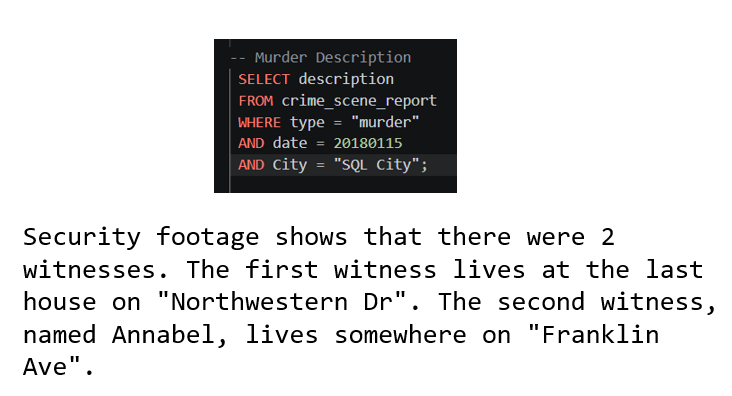
So there are 2 witnesses that gives us 2 options for follow up inquiries. Lets start with witness 1.
Witness 1
We know that they live at the last house number on Northwestern Dr.
The JOIN clause is how we join tables in SQL. When we join tables we must define on which fields using ON. Here I used person.id = interview.person_id to join the interview table to the person table in order to find the interview transcript using the details we know of witness 1 from the person table. When joining tables, its common practice to write the fields with the syntax table.field. This is useful as if the joined tables have identical field names we would get an error, plus it makes it a whole lot easier to keep track of your fields. Join happens early in the order of operations, simultaneousy with FROM. There are other types of join but for this challenge I was only required to perform inner joins using JOIN.
GROUP BY groups our table by a field. It is used when aggregating over the grouped field or using MIN/MAX operations. Below I used it in order to identify the last house number as the MAX address number.
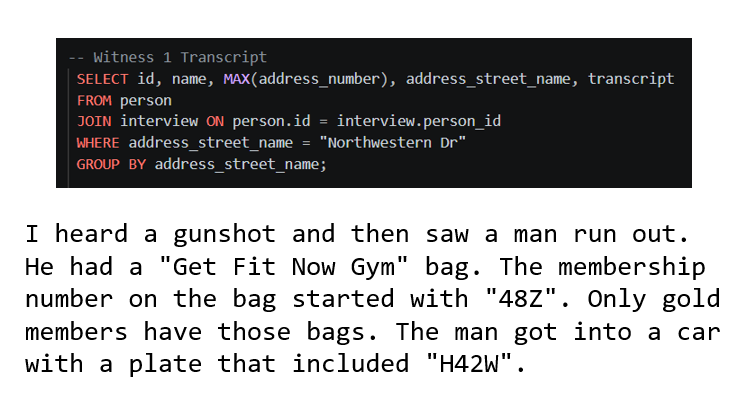
The suspect has a gold membership at the gym, a bag starting with 48Z and a car with a plate including H42W. That gives us a lot that we can use to hone in on our murderer!
I use the LIKE clause for one of my WHERE statements to filter by id's that contain the string "48Z%". The % allows us to say that anything can come after the 48Z. For example if we want just wanted id's that ended in 48Z it would be LIKE "%48Z" and any id's that contain it regardless of position would be LIKE "%48Z%".
The WITH clause allows us to define a temporary table that can be used just for that query. It is incredibly useful for simplifying complex statements. Below I use it to join and filter the get_fit_now_member and person tables to just output the person name and license id fields as a new temporary suspects table. The syntax is WITH "temp table name" AS ("sub-query"). WITH occurs first before the SELECT name query below allowing me to join my new suspects table on the drivers license table and narrow it down to 1 suspect!
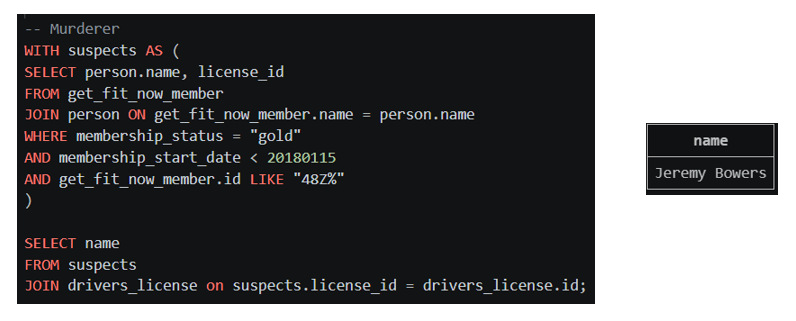
We now have it narrowed down to a single name but being a good detective lets also go through our witness 2's interview to ensure they line up.
Witness 2
Just a refresh our witness 2 is called Annabel and lives somewhere on Franklin Ave.
Here I use another WITH statement with a sub clause using our clues to identify our witness. I then select their interview transcript from the interview table.
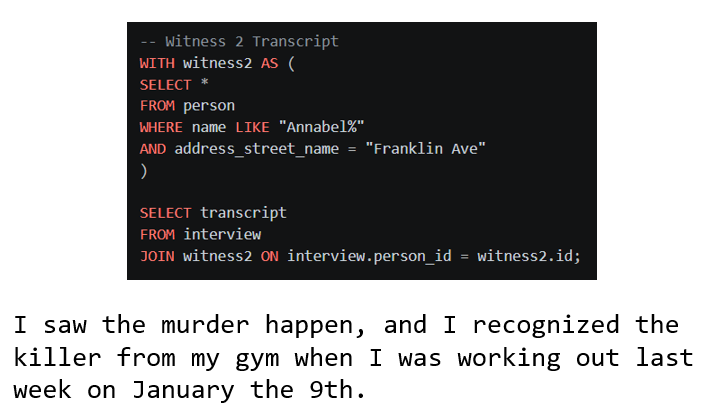
Okay great 2 more leads. First they saw the murder happen and second they saw the suspect at the gym on January 9th.
First lets make a temporary table suspects using a WITH clause that just provides a list of all the people who used the gym on the 9th of January along with their check in and check out tables.
Next we use another useful feature of JOINS in SQL self joins. I didn't mention this earlier but whenever we call on a table in SQL we can rename it for our query using FROM table "new table name". Here I use suspects as s1 which allows me to self join the table by joining it with suspects s2. This allows us to filter our table by a specific row. Here we are essentially looking for gym goers who's attendance overlapped with Annabel's.
JOIN suspects s2 ON s2.check_in_time < s1.check_out_time
This creates our self join and specifies that our second table person must have checked in before our first table person has check out.
AND s2.check_out_time > s1.check_in_time
This adds the additional join clause that our second table person must also have checked out after our first person has checked in. These two statements create an overlap meaning that our first person must have been at the gym at the same time as our second person.
WHERE s1.name = "Annabel Miller"
We can then use the above statement to filter our first person to be our witness Annabel Miller.
AND s2.name <> "Annabel Miller"
This is just to ensure Annabel does not appear as our second person as obviously she was at the gym at the same time as herself. In SQL the <> acts as our not equal to operator.
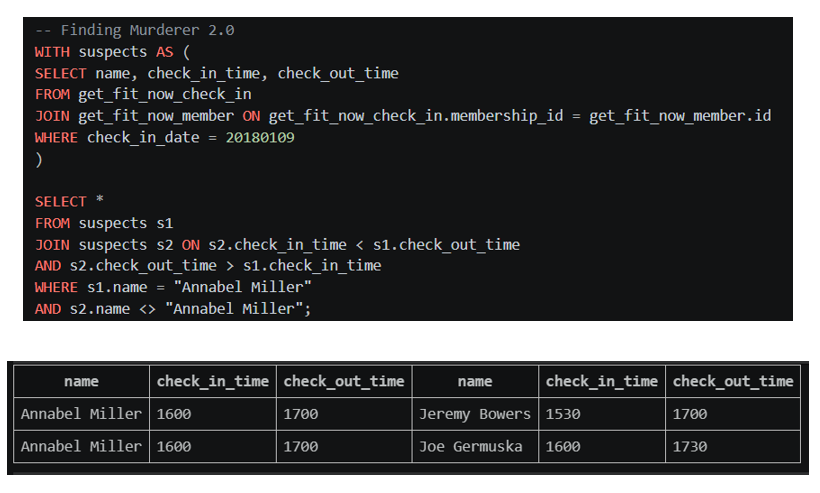
Okay so Annabel was at the gym with 2 others on this date seems we have to narrow it down further. Well Annabel said she saw the murder take place and we also have a table for Facebook events so maybe we should check if Annabel was at an event on the date of the murder and who else was there?
Here I use another WITH clause to join the Facebook events to person table on their id's and filter to events that occurred on the date of the murder.
I then use another self join to filter to see only names that attended the event at the same time as Annabel.
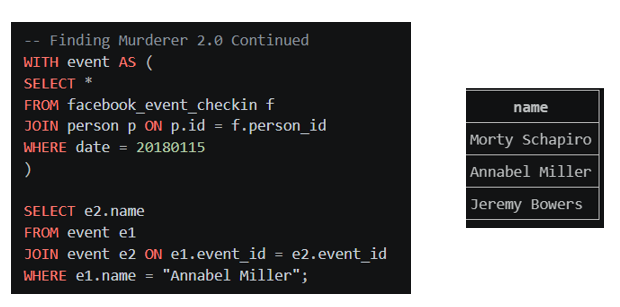
And we're left with 3 names 2 of which are our witnesses with the final one being our top suspect!
Then using the given query for checking the solution...
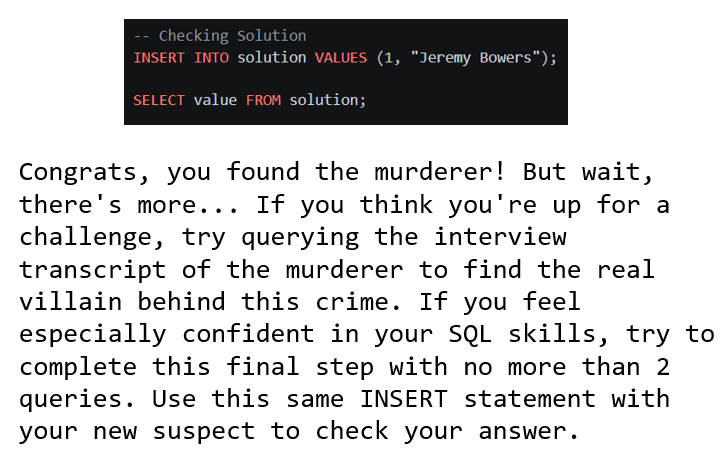
Finding the Villain
So there's a villain behind it all and we can only use 2 queries. I decided to start by viewing the murderers interview transcript.
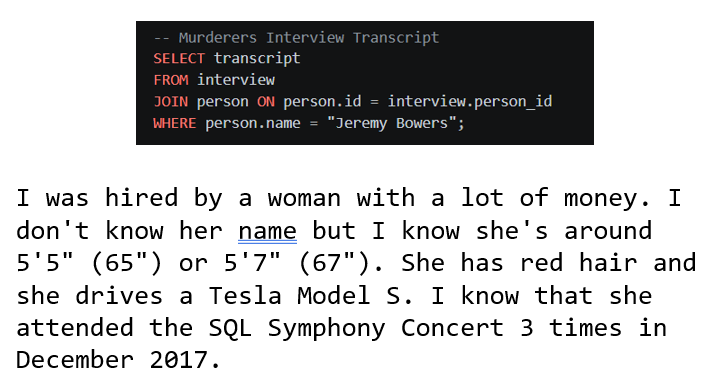
Now we know a bunch of information about our villain. She's a woman with red hair and drives a Tesla Model S.
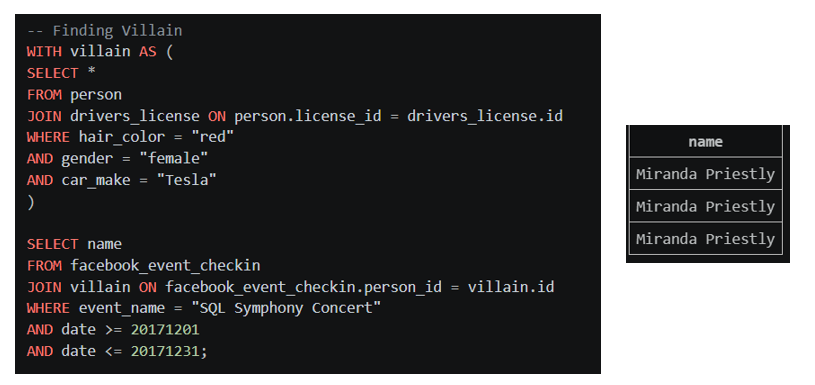
I use this information to construct another temporary table, villain, for all the red haired tesla driving woman.
We then know she attended the SQL concert 3 times in December 2017 so joining our villain table with our Facebook event table and filtering by these clues we're left with just 3 names which turn out to be all the same person a good indicator we're done this right.
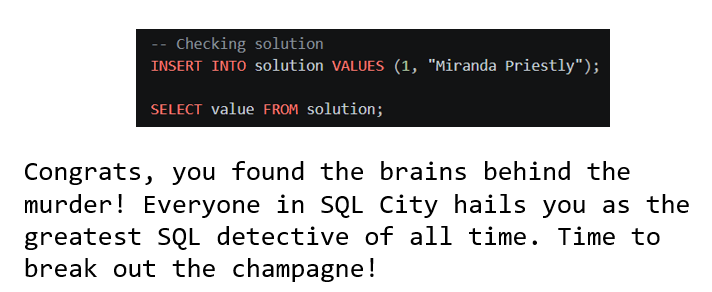
And there you go case closed!
For this problem there are many different possible approaches and different queries that may or may not work so if you haven't already I would still say it's worth giving it a go if only to further optimise my queries.