


A Regular Expression is simply a sequence of characters that forms a search pattern. Instead of looking for a specific word like "Apple", you use RegEx to look for structural patterns, such as "three digits, followed by a dash, followed by four letters."
Here is a quick cheat sheet of common RegEx you will use in Alteryx:
\d: Matches any single digit (0-9).\w: Matches any word character (letters, numbers, or underscores).\s: Matches any whitespace (spaces, tabs).+: Matches one or more of the preceding element (e.g.,\d+means "one or more digits")..*: Matches anything and everything (wildcard).(): A capture group. This tells Alteryx, "I care about this specific part of the pattern, isolate it."
It is important in RegEx to put a \ before any special character to identify it e.g. \£ to search for £ signs.
The RegEx tool in Alteryx doesn't just find patterns; it dictates exactly what to do with them. Once you connect the tool to your data stream and select the column you want to target, you must choose one of four Output Methods:
Out of these Parse is generally the most useful for searching text. An example of this is after I had web scraped some data on books I wanted to find the book price from with the html.
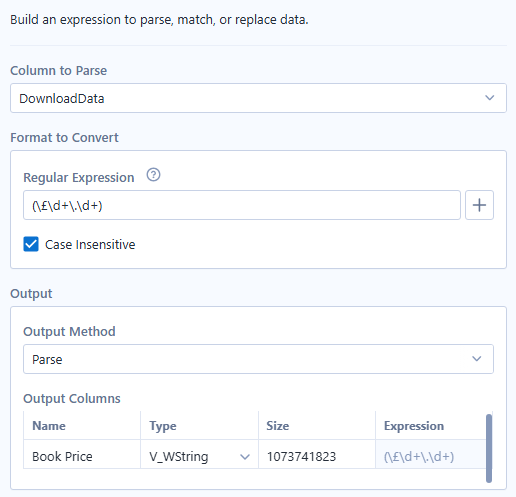
By using this expression I am searching my field for any structures of text following the form £, (\£), followed by one or digit, (\d+ ), then a full stop, (\.), and again one or more digits. This will search for anything that looks like: £54.62 as an example.
Our price will then be outputted to a brand new Book Price column!
RegEx starts off looking confusing and complicated but with a bit of practice becomes an incredibly convenient and useful tool for data handling.