I have a strong interest in photography, having worked in a camera shop for an entire year before starting at the data school. During my time at the shop I found remembering all the specs of older DSLR Cameras was a bit tricky.
That's where I got the idea for creating this web scraping script, using Pythons BeautifulSoup library to scrape DSLR cameras from Wikipedia.
Wikipedia:
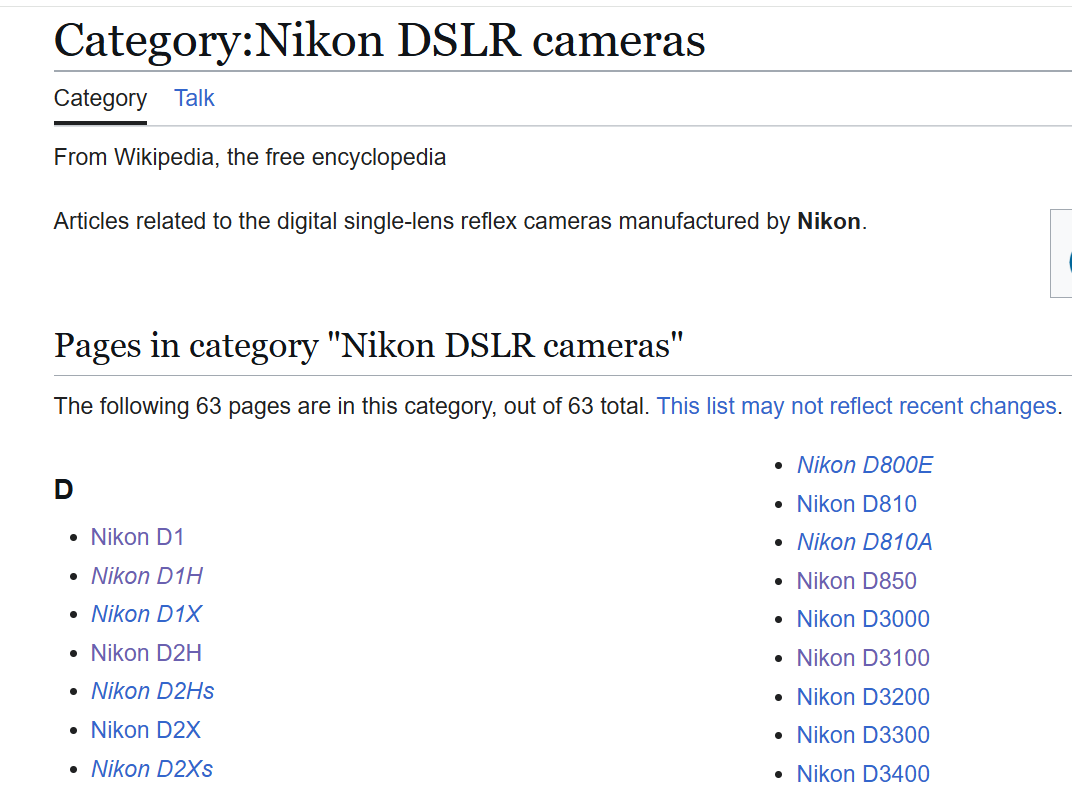
Wikipedia has these great category pages which link to all the other pages within that category.
This is a great way to get a list of all the DSLR camera form a particular brand, but also will take us to the individual pages for each camera where we can get the specs. This is the first thing we will be targeting with our script to get a list of links to then scrape.
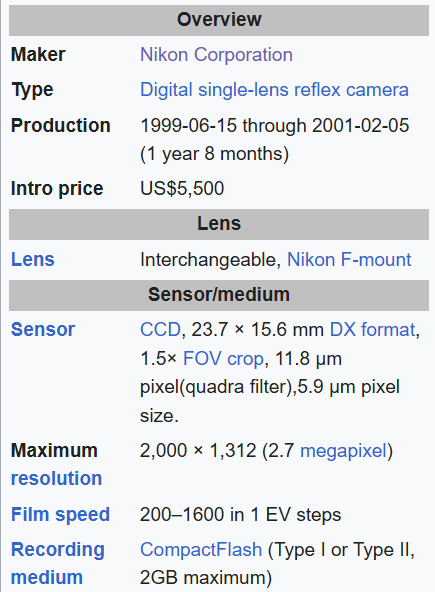
Each Wikipedia page has an infobox with a summary of the most important information from the article. In the case of camera pages this contains useful info such as the camera's specs.
This is the information we will scrape from each page in our list of links.
The Script:
1. Importing the Libraries
The first step is importing the Python libraries needed for the project.
- Request - Sends HTTP requests to retrieve webpages from Wikipedia.
- Pandas - Organises the scraped information into DataFrames, cleans and standardises the data, and exports it to CSV files.
- JSON - Provides tools for working with JSON data. It is imported in the script but isn't actually used.
- Time - Adds a delay between requests to avoid sending them too quickly.
- BeautifulSoup - Parses the webpage's HTML, allowing you to locate and extract camera specifications.
- URL Join - Combines Wikipedia's base URL with relative links to create complete URLs.
- Pathlib - Creates file paths and helps save the resulting CSV files to your home directory.
import requests
import pandas as pd
import json
import time
from bs4 import BeautifulSoup
from urllib.parse import urljoin
from pathlib import Path
import time
2. Finding the Camera Pages
I started by setting up my base URL, this will be combined with links within the category listing to create complete links to each camera page.
Following this I set Wikipedia's category page for Nikon DSLR cameras where the script will look for the links, and a header.
I then created a headers dictionary containing a custom User-Agent to identify my scraper when sending requests to Wikipedia. This follows Wikimedia's guidance for automated requests.
base_url = "https://en.wikipedia.org"

INDEX_URLS = {
    "Nikon": "https://en.wikipedia.org/wiki/Category:Nikon_DSLR_cameras",
}

headers = {
    'User-Agent': 'MyDataScraper/1.0 (contact: youremailaddress@gmail.com)'
}
We then use the following script to scrape all the links form the category page.
links_to_scrape = []

for brand, index_url in INDEX_URLS.items():
    res = requests.get(index_url, headers=headers)
    soup = BeautifulSoup(res.content, "html.parser")

    for a_tag in soup.select('div.mw-category a[href^="/wiki/"]'):
        relative_link = a_tag["href"]

        # Skip Wikipedia's meta pages
        if ":" in relative_link.replace("/wiki/", ""):
            continue

        full_url = urljoin(base_url, relative_link)

        if (brand, full_url) not in links_to_scrape:
            links_to_scrape.append((brand, full_url))

print(len(links_to_scrape))
print(links_to_scrape)
3. Scraping the Camera Specifications
Once I had collected the links, I visited each camera page individually.
For every page, I extracted the camera's model name and located its infobox, which contains key specifications. I then looped through the infobox rows to collect the specification names and their corresponding values.
Each camera's information was stored in a Python dictionary.
In order to avoid being blocked I add a short delay between requests to avoid sending them too quickly.
Once all the cameras had been scraped, I used Pandas to convert the collected data into a DataFrame and saved it as a CSV file. This means we don't need to redo any of our web scraping if we want to change anything in the next step.
scraped_cameras = []

for brand, link in links_to_scrape:

    print(f"Scraping: {brand} | {link}")

    res = requests.get(link, headers=headers)
    soup = BeautifulSoup(res.content, 'html.parser')

    heading = soup.find('h1', id='firstHeading')
    title = heading.text.strip() if heading else "Unknown"

    camera_data = {
        "Brand": brand,
        "Camera Model": title,
        "URL": link
    }

    infobox = soup.find('table', class_='infobox')
    if infobox:
        for row in infobox.find_all('tr'):
            header = row.find('th')
            data = row.find('td')
            if header and data:
                camera_data[header.text.strip()] = data.text.strip()


    scraped_cameras.append(camera_data)
    time.sleep(1)

print(f"Scraped {len(scraped_cameras)} cameras.")

df_raw = pd.DataFrame(scraped_cameras)
output_path = Path.home() / "scraped_cameras.csv"
df_raw.to_csv(output_path, index=False)
print(f"Saved to: {output_path}")
4. Cleaning and Standardising the Data
The raw dataset contained inconsistent column names because different Wikipedia pages can use different labels for similar specifications.
To address this, I standardised the column names by converting them to lowercase and removing unnecessary whitespace. I then created a dictionary of aliases to map different labels to consistent names. For example, fields such as "Released", "Introduced" and "Announced" could be consolidated into a single release-date field.
Where multiple columns contained the same type of information, I used Pandas to select the first available value.
Finally, I created a cleaned DataFrame containing the camera model, URL and selected specifications, and exported it as cameras.csv.
csv_path = Path.home() / "scraped_cameras.csv"
df_raw = pd.read_csv(csv_path)
df_raw.columns = df_raw.columns.str.strip().str.lower()


ALIASES = {
    "Release date":       ["release date", "released", "introduced", "announced"],
    "Sensor":             ["sensor", "sensor type"],
    "Sensor Size":        ["sensor size", "sensor dimensions"],
    "Maximum resolution": ["maximum resolution", "max resolution"],
    "Film speed":         ["film speed", "iso"],
    "Release date":       ["release date", "announced"],
    "Price":              ["price", "launch price"],
    "Storage media":      ["recording medium", "storage media"],
}

def consolidate(df, aliases):
    out = {}
    for final_name, names in aliases.items():
        present = [c for c in names if c in df.columns]
        if present:
            out[final_name] = df[present].bfill(axis=1).iloc[:, 0]
    return pd.DataFrame(out, index=df.index)

df_cleaned = pd.concat(
    [df_raw[["camera model", "url"]], consolidate(df_raw, ALIASES)],
    axis=1,
)


df = pd.DataFrame(df_cleaned)

output_path = Path.home() / "cameras.csv"
df.to_csv(output_path, index=False)
print(f"Saved to: {output_path}")
5. The Final Result
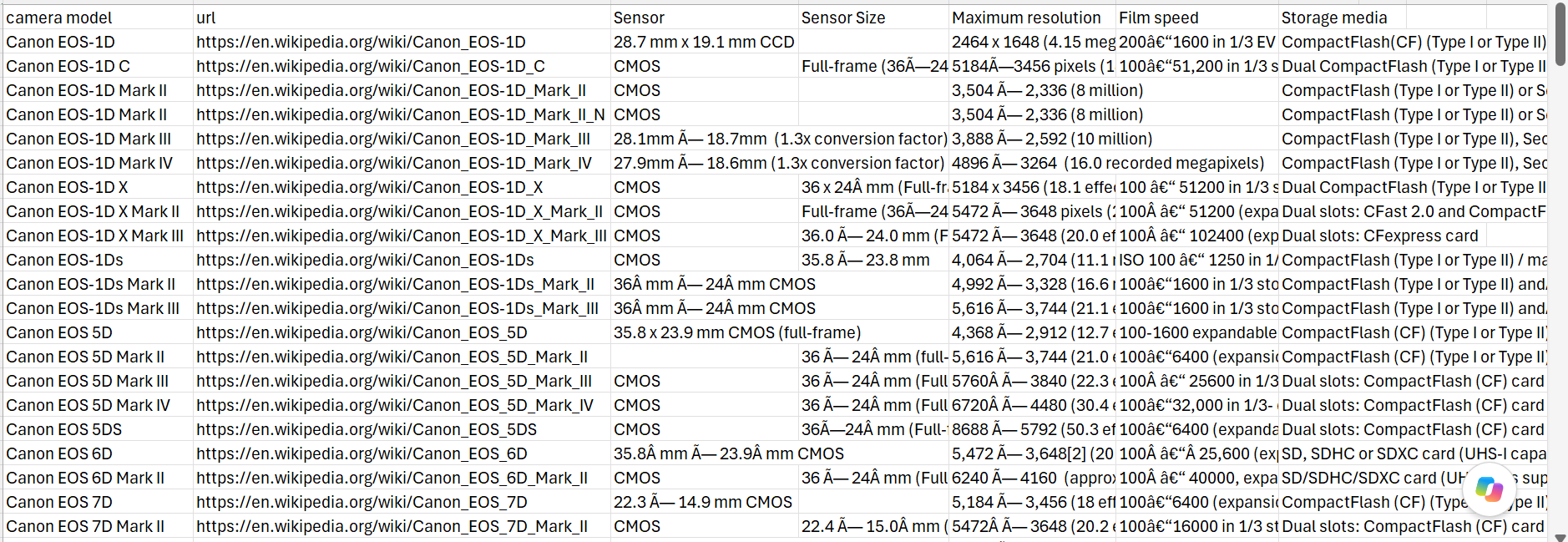
The result was a structured CSV dataset containing Nikon DSLR camera models and their available specifications.
If we want to get the specs for different brands we can at the category page for each brand we want to our index url list.
INDEX_URLS = {
    "Canon": "https://en.wikipedia.org/wiki/Category:Canon_EOS_DSLR_cameras",
    "Nikon": "https://en.wikipedia.org/wiki/Category:Nikon_DSLR_cameras",
    "Sony": "https://en.wikipedia.org/wiki/Category:Sony_A-mount_DSLR_cameras",
    "Olympus": "https://en.wikipedia.org/wiki/Category:Olympus_DSLR_cameras"
}
As you can see the data is still very messy, it does however give us all the information we are looking for. The next step will be cleaning the data further with an Alteryx flow!